
Own-CNIC actions only · Reviewed 29 September 2026 · Transfer, disown and block, step by step
A SIM ownership transfer is made at an authorised outlet of the network the SIM is on now, with the registered person and the new holder both there. Of the three things a CNIC holder can do to a SIM, moving it, removing it and blocking it, only blocking a lost SIM can start by phone; the other two go through PTA’s fingerprint check at an outlet. Disowning, blocking, failures, special cases, nine myths, eight scams and monthly checks follow.
SIM Ownership Transfer: Moving a SIM Into Your Own Name
PTA’s change-of-ownership FAQ makes the presence of both people mandatory, the person the SIM is registered to and the person who will hold it, and the SIM then leaves the first person’s CNIC and is registered against the second’s. What is already registered on each CNIC, and the name on a CNIC’s SIMs, can be read beforehand with sim owner details in Pakistan: the official checks.
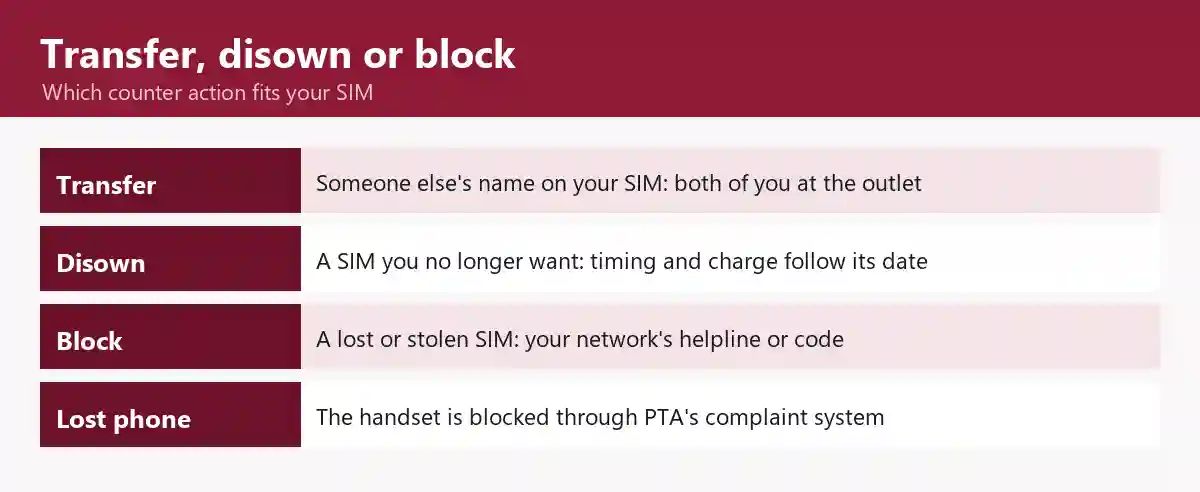
Transfer, Disown or Block: Which Action Fits
| Your situation | Action | Who goes | Where it is explained |
|---|---|---|---|
| A SIM you use is registered to someone else, such as a relative | Change of ownership | You and the registered person | the transfer steps below |
| A SIM on your CNIC you no longer want | Disowning | You | disowning a SIM |
| A SIM on your CNIC you never took | Start with the network it is on | You | a SIM you never bought, then the waiver row in the disowning table |
| A lost or stolen SIM | Block it through its network; a duplicate SIM later | You, by phone or at a service centre | blocking a SIM |
| A lost or stolen phone | Block the handset’s IMEI through PTA | You | the handset block, step by step |
| The registered person has died or is abroad, or the SIM is a company’s | Change of ownership with the extra conditions | Family, for a deceased holder | the special cases |
How to Transfer SIM Ownership in Pakistan, Step by Step
A SIM owner change takes five steps: two before you go, two at the outlet, and one check afterwards.
- From the SIM itself, confirm the name it is registered under with the 667 name check, so you know whose presence you need.
- Find an authorised outlet of the network the SIM is on now, using the location of a genuine outlet. For a number that has been ported, PTA’s porting guidelines take a change of ownership only at that network’s customer service centre.
- Go together, each with your valid CNIC, and carry the original card, which Telenor’s own change-of-ownership page asks both people to bring.
- Ask for a change of ownership of the number. The outlet runs the fingerprint check against NADRA that PTA lists for every change of ownership; a match that fails is covered in the counter-failures table.
- Once it is done, confirm the SIM now counts on your CNIC: count the SIMs on your CNIC.
Can SIM Ownership Be Changed Online?
No. A change of ownership is one of the transactions PTA puts through a fingerprint check at an authorised outlet, so no website, app or call centre can make it. Even the paper route in PTA’s rules for a ported number, an authority letter when the owner cannot come, is handed in at a customer service centre.
The Waits Around a SIM Ownership Transfer
PTA’s gap between new SIMs on one CNIC does not apply to a change of ownership (the gap between new SIMs); whether the one-year disowning rule reaches transfers is set out in what the disowning advisory covers; and a ported number has its own waits before and after a transfer (the porting waits around a change of ownership).
Is There a Fee for SIM Ownership Transfer?
PTA’s change-of-ownership FAQ names no fee, so any charge is set by the network. Telenor’s own change-of-ownership page, in its October 2023 copy, lists a fee for a normal prepaid number. Ask the outlet for the charge before you both go; each network’s own terms are in its guide.
Telenor SIM ownership transfer · Zong SIM ownership transfer · Ufone SIM ownership transfer
What an eSIM Changes
In PTA’s eSIM decision of 7 August 2026, an eSIM transfer means moving the eSIM profile from one phone to another, which is a different thing from a change of ownership. What an eSIM costs and how many free moves come with it are set out in eSIM prices in Pakistan and moving an eSIM to a new phone.
Disowning a SIM: Removing a Number From Your CNIC
Disowning takes a SIM off your CNIC at an authorised outlet of the network the SIM is on now, with your valid CNIC and a fingerprint check, since PTA lists disowning among its fingerprint transactions; whether it can be done yet, and at what charge, depends on the SIM’s activation date and how long you have held it.
What Does SIM Disowning Mean?
It means asking the network to take a SIM registered on your CNIC off your record. PTA’s release on the 2013 re-verification drive described what followed: the network approached whoever was using the SIM to register it on their own CNIC, and blocked the SIM otherwise.
How to Disown a SIM in Pakistan
Find the SIM’s network and date at home, then take your CNIC to that network’s counter.
- Find the network that holds the SIM: read the per-network count.
- Find the SIM’s activation date. If the 667 reply from that SIM shows one, note it (what the 667 reply can show); if it does not, or you do not hold the SIM, ask the counter which row of the disowning table applies.
- Go to an authorised outlet of that network with your valid CNIC.
- Ask to disown the number, and place your finger on the scanner when the agent asks; the check itself is explained in how the fingerprint check works.
- Pay what the charge rules below allow, or ask for the one-time waiver if the SIM was issued without your consent.
- If the SIM still shows on a later count, see a SIM you disowned still shows.
SIM Disowning Charge and the 365-Day Lock, by Activation Date
| The SIM | Can it be disowned now? | Charge | Source |
|---|---|---|---|
| Activated on or after 24 May 2026, the date of PTA’s advisory | Not until a year after activation: PTA’s advisory says any newly activated SIM “can now only be disowned after one year of activation” (the 24 May 2026 disowning advisory) | By the time the year is up the SIM has been held longer than the six months PTA’s cap covers, so the note below applies | PTA public advisory, 24 May 2026 |
| Activated before 24 May 2026 | Ask the counter before you go; what the advisory says about SIMs activated before it is set out in PTA’s 2026 SIM rules: questions answered | Up to Rs 200 if you have held it for less than six months (from 1 January 2024); see the note for a SIM held longer | PTA, 10 November 2023 |
| Registered on your CNIC without your knowledge or consent | PTA does not say whether the one-year lock applies, so ask when you raise it; the first step is in a SIM you never bought | PTA grants a one-time waiver of the disowning charge | PTA, 10 November 2023; PTA public advisory, 24 May 2026 |
PTA’s release of 10 November 2023 caps the charge only for a SIM held under six months and gives no figure for a SIM held longer, so ask the counter what it charges before you pay.
Can a SIM Be Disowned Online Through cnic.sims.pk?
No. cnic.sims.pk returns a count of the SIMs registered against the ID you enter, and nothing else: there is no disown, block or transfer button. The count tells you which network holds a SIM you want removed, and the steps above take it from there.
How Do You Block SIMs on Your CNIC That You Do Not Use?
On your own CNIC the lasting route is disowning, set out above. A block is the step for a lost or stolen SIM, and Ufone’s code of practice calls it a temporary one (blocking a SIM); a SIM you never took starts with a SIM you never bought.
Blocking a SIM: Lost, Stolen or Locked
A lost or stolen SIM is blocked by the network it is on, through its helpline, its self-service code or its service centre, and speed matters: Zong’s terms say a customer who does not ask for the block within 24 hours of the loss is not absolved of criminal liability.
How to Block a SIM, Network by Network
| Network | Route | Call or dial from | Charge | Source, and the network’s own guide |
|---|---|---|---|---|
| Jazz | Dial *8822# and follow the prompts, or call 111; the same route restores the number once the SIM is recovered | Any Jazz number | Free | Jazz FAQ; Jazz’s helpline and other channels |
| Zong | Ask Zong to block it on its helpline, 310 | A Zong number | Zong’s helpline charges | Zong’s terms, for the request to block, and Zong’s contact page, for 310 |
| Ufone | Ask for a temporary block through Ufone’s call centre, 333, or at a service centre, answering any three of Ufone’s verification questions (such as your name, CNIC number, father’s name, address, last recharge or frequently dialled numbers) | A Ufone number, for 333 | Not stated | Ufone code of commercial practice, and Ufone’s change-of-ownership page for 333; Ufone’s helpline and service centres |
| Telenor | The Telenor guide’s lost-SIM route | — | — | — |
| Onic and SCO | The Onic and SCOM guide | — | — | — |
A new SIM with the same number is a duplicate SIM, one of the transactions PTA puts through the fingerprint check; its charge sits with each network’s guide and replacing a SIM and keeping the number.
Is There a PTA SIM Block Check Online?
No. PTA’s public SIM service, cnic.sims.pk, returns a count of the SIMs on a CNIC and nothing about blocks, and PTA’s lost-phone blocking works on the handset’s IMEI rather than on the SIM (blocking a lost phone’s IMEI). Whether a SIM is blocked is a question for the network it is on, on the route in the table above.
Why Is a SIM Blocked?
A SIM is blocked for a reason its network or PTA can name: its holder reported it lost or stolen, it was reported as a scam number, a wrong PUK was entered, or it is registered to someone who has died. The list below gives the source for each and where the fix is.
- Reported lost or stolen by its holder: the route in the blocking table above.
- Reported as a scam number: PTA’s scam page says PTA blocks such a number together with the handset’s IMEI, and blacklists the CNIC of a repeat offender for new SIMs.
- A wrong PUK entered: opening a blocked SIM.
- Registered to a person who has died: Jazz says Government of Pakistan instructions require it to block such a SIM; the family transfer is in transferring a deceased person’s SIM.
- PTA has also warned about SIMs on expired or cancelled CNICs: PTA’s advisories on expired CNICs.
What happens to a SIM left unused is covered in reactivation and number recycling.
How Do You Open a Blocked SIM?
On Jazz, a number blocked after a loss is restored through the same code or helpline once the SIM is recovered; Ufone asks for the same verification answers to lift a block as to place one. A PIN-locked SIM needs the PUK: on Jazz, SMS your full number to 7023 from that Jazz number, or use 99999999 (eight nines) instead.
Jazz warns that entering a wrong PUK may block the SIM, requiring a replacement; set a PIN of 0000 afterwards, and if the PUK does not work, go to a Jazz franchise or experience centre. On another network, ask for the PUK on its helpline (the blocking table above, or the network’s own guide).
Can a CNIC Be Blocked, and How Do You Check?
A CNIC is NADRA’s document, so whether one is blocked, and why, is answered by NADRA, not by PTA or a network; NADRA’s call centre is 1777, open around the clock. Every counter action on this page needs a valid CNIC, so a card problem is settled with NADRA first.
More on the registry itself: what NADRA holds, and what it never publishes.
When a Check or a Counter Visit Fails
The first table sends each failed check to the page that explains it; the second gives the published rule behind each failed counter visit, with its source.
Check Failures: Where Each Fix Lives
| What happened | Where the fix is |
|---|---|
| 668 sends no reply, or cnic.sims.pk rejects the entry | the 668 and portal steps |
| No reply from 667, or a reply with fields missing | the 667 reply and what to do when it does not come |
| An own-number code returns nothing | every network’s own-number code |
| A 76367 network check fails | the 76367 network check |
| The count is higher than the SIMs you can name | when the count looks wrong |
Counter Failures: The Rule Behind Each
| What happened | The rule | What to do |
|---|---|---|
| The transfer was refused because the registered person did not come | The presence rule (who has to be at the outlet) | Bring them, or see the special cases if they are abroad or have died |
| A ported number’s transfer was refused at a franchise | The customer-service-centre rule in step 2 of the transfer steps | Go to that network’s customer service centre |
| A recently ported or transferred number was refused | The porting waits | the porting waits |
| The fingerprint did not match, or cannot be given | PTA’s rules for a failed match and its administrative route | why a fingerprint fails, and the route when it cannot be given |
| The SIM was not handed over after a match | PTA takes a complaint with the outlet’s details | what happens at the counter |
| Disowning was refused, or a charge was asked | The activation-date rules | the disowning charge and lock table |
| A deceased holder’s SIM: the documents were not accepted | Each network’s list differs | the per-network documents table |
Special Cases: Owner Abroad, Deceased Holder, Company Number
PTA’s change-of-ownership FAQ allows additional verification, under the procedure in vogue, when the registered person has died or is abroad, and names no document list; the networks publish their own lists for a deceased holder, and PTA’s porting guidelines set the conditions for a company number that has been ported.
When the Registered Owner Is Abroad
For a ported number, PTA’s porting guidelines accept an authority letter from the registered owner naming a person to make the request, with the original CNICs of that person, the owner and the new holder, at a customer service centre. For any other number, ask the network which verification it runs before anyone travels.
Transfer of a Deceased Person’s SIM
NADRA’s statement of 9 April 2026, as Dawn reported on 10 April 2026, advised that SIMs registered in the names of deceased relatives be transferred to the CNIC of the current user. The networks that publish a procedure ask for proof of the death, proof of the family link and the SIM itself, or a police report if it is lost; the details differ, so use your network’s column.
| Requirement | Jazz | Zong | Ufone |
|---|---|---|---|
| Who may apply | A blood relative as shown on the FRC | Relatives only | Family members as shown on the FRC: siblings, father, mother, spouse, children |
| Proof of death | A death certificate from a government body, Union Council and/or NADRA | The original death certificate from NADRA or the Union Council | A death certificate issued through NADRA; Ufone’s change-of-ownership page asks instead for one from the local court |
| Proof of family | The original FRC, plus an NOC or affidavit from the other family members | The original FRC | The FRC; the change-of-ownership page asks for a succession certificate and an NOC from the other heirs |
| Identity | The deceased’s original CNIC or its cancellation certificate, your original CNIC, and an undertaking you sign at the outlet | Your CNIC, not an expired one, and a company NOC you sign | Your CNIC |
| The SIM | The SIM itself; the last recharge or call history is checked | The deceased’s SIM; the last recharge or call history is checked | The active SIM, presented at the service centre; the last recharge or call history |
| If the SIM is lost | A police report or FIR with an NOC | An original FIR covering the lost SIM | An FIR naming the number |
| Where | Not stated; ask Jazz which outlet takes it | A Zong Sales and Service Centre | A Ufone franchise, or a Sales and Service Centre on the change-of-ownership page |
| Other conditions | No active JazzCash account on the number; refused if the number had a port, a duplicate SIM or a new SIM in the last 30 days | None stated | Ufone’s two pages list different documents, so confirm which applies with Ufone before you go |
| Charge and time | Free; 2 business days, 4 for golden numbers | Not stated | Not stated |
For the other networks, see the documents Telenor lists and, for Onic and SCO, the Onic and SCOM guide.
A Company Number Moving to a Person
For a ported company number, PTA’s porting guidelines let the number move to the person the company has named as its user for the last 60 days, once the company account’s dues are cleared and the company’s authorised signatory issues an NOC on letterhead with the company stamp, followed by the fingerprint check. For a number that has never been ported, ask the network’s business desk for its own list.
Who can hold a SIM at all, children and foreign nationals included, is set out in who can register a SIM, and on which document.
Is There a SIM Ownership Transfer Letter Sample?
No letter appears in PTA’s change-of-ownership FAQ for an ordinary transfer (see the transfer rule). The letters that do appear in the published rules are the owner’s authority letter for a ported number, a company’s NOC on letterhead and the family NOC or affidavit some networks list for a deceased holder, each set out above.
Nine Myths About SIM Ownership and Safety
Each of these is contradicted by something PTA, NADRA or a network has put in writing, and the right-hand column says where.
| Myth | Short answer | Where it is set out |
|---|---|---|
| A copy of the registered person’s CNIC is enough to move their SIM into your name | No | who has to be at the outlet |
| Disowning is free and can be done any day | Not always | the disowning table |
| PTA blocks a lost SIM when you call its helpline | No | blocking a SIM, network by network, and what PTA’s own lost-phone system blocks |
| Nobody can put a SIM on your CNIC without you | PTA’s raids found SIMs activated illegally at franchises: 25 active SIMs in Ratodero (14 February 2024), and SIMs issued through biometric scanners seized in Shahkot, Haveli Lakha and Yazman (26 November 2025) | section 17 of PECA 2016 and the penalties for SIM sellers |
| A paid site can show who owns a number | No | what the named lookup sites really return |
| Handing your SIM to a relative hands over the responsibility | No | who PTA holds responsible for a SIM |
| A disowned SIM leaves your count the same day | Not necessarily | a SIM you disowned still shows |
| A deceased relative’s SIM can stay in use as it is | No | the family transfer of a deceased holder’s SIM |
| Porting a number puts it in your name | No: a port changes the network, not the CNIC | MNP versus change of ownership |
Eight SIM Scams and the Tell Each One Gives Away
Every one of these asks for something of yours first, money, a code, a fingerprint or a copy of your CNIC, before it gives anything back.
| Pattern | The tell | What to do |
|---|---|---|
| A look-alike SIM-count site | It asks for anything beyond your 13-digit CNIC and the verification box, or for a fee or an app, before it shows a count | Enter only your 13-digit CNIC, on cnic.sims.pk itself (what cnic.sims.pk does and does not do) |
| “Install our app to see the result” | The result sits behind an install | what a SIM-check app really asks for |
| A blurred owner record unlocked by payment | A name or CNIC promised for a number that is not yours | how the pay-to-unlock sites work |
| A chat-app seller offering other people’s SIM records | Records offered for a number that is not yours | Obtaining, selling or holding another person’s identity information without authorisation is an offence under section 16 of PECA 2016 (penalties in the law in full and the five-question test); where the records such sellers offer come from |
| A message or call saying the SIM must be re-verified through a link | Re-verification offered by a link or a phone call | Re-verification is one of PTA’s fingerprint transactions, done at an outlet: SIM re-verification |
| A thumbprint for a gift, survey or support scheme | A fingerprint asked for anything other than your own SIM at an authorised outlet | PTA’s own analysis found almost 85% of SIMs used in fraud cases belong to women; where your fingerprint should never go |
| A caller “from your network” asking for a code or PIN | A one-time code or PIN asked for over the phone | PTA’s rule, quoted below; the frauds that target your number |
| Your number moved to someone else’s name or network | The SIM stops working without a reason you know of | PTA’s porting guidelines call a change of ownership without the owner’s consent fraudulent: recovering a number moved without consent; on Jazz, Jazz’s window for disputing a change |
The One Rule, and Where to Report
PTA puts it in one line: “Never send money or give ATM or PIN details, online account details or copies of personal documents to anyone you don’t know or trust.” Where a scam number is reported, in what order and through which PTA and NCCIA channels, is set out in the fraud and harassment reporting route.
If You Already Paid or Shared Something
PTA’s advice, when money or banking details have already gone, is to contact your bank and the police immediately; banking fraud goes to the State Bank of Pakistan’s consumer desk, [email protected], as PTA’s scam page lists. If an app is already installed, follow removing a SIM-check app and what to change afterwards. If a copy of your CNIC has already been sent, start the monthly check below now.
Your Monthly SIM Safety Checklist
PTA’s advisory of 24 May 2026 asks the public to check the SIMs on their CNIC regularly, on cnic.sims.pk or by the 668 SMS; the routine below makes that a monthly habit and adds the checks that go with it.
| Check | How often | Where |
|---|---|---|
| Count the SIMs on your CNIC | Monthly | the count, step by step |
| Set the total against the SIMs you can name | Monthly | when the count looks wrong, including a SIM you never bought |
| Confirm each SIM’s own number | Every few months | own-number codes by network |
| Disown a SIM you no longer use | When you stop using it | the disowning steps |
| After losing a phone | The same day | blocking the SIM and the handset block |
Roman Urdu mein: SIM transfer, disown aur block karne ka tarika
Baqi official checks Roman Urdu mein: SIM check karne ka tarika.
SIM ownership transfer karne ka tarika
SIM ka owner ya owner name change karwane, yaani SIM apne naam karwane, ke liye jis ke naam par SIM hai woh aur aap, dono apna asli CNIC le kar us network ke authorised outlet par jaayein jis par SIM ab chal rahi hai; wahan fingerprint verification (BVS) hoti hai, aur yeh kaam online nahi hota. Poore steps upar hain: SIM ownership transfer, step by step.
SIM disown karne ka tarika
SIM disown karne ka matlab hai SIM ko apne CNIC se hatwana, aur yeh usi network ke authorised outlet par asli CNIC aur fingerprint verification (BVS) se hota hai. Kab ho sakti hai aur kitne charges lag sakte hain, yeh disowning ki table mein hai.
SIM block karne ka tarika, aur number block karna
SIM band karwana aur SIM block karwana ek hi darkhwast hai: SIM aap ke naam par hai aur gum ya chori ho gayi hai to foran us network se block ki darkhwast karein, helpline, code ya service centre ke zariye; har network ka tarika SIM block karne ki table mein hai. Tang karne wala number report karein, aur apne phone par kisi number ko block karna phone ki setting hai, jis ke steps apne phone par number block karne ka tarika mein hain.
Where the Facts on This Page Come From
Change of ownership and its exceptional cases: PTA FAQ, 22 September 2025 · the six fingerprint transactions, the 85% figure and the outlet rules: PTA biometric verification page, undated · the gap between new SIMs: PTA, 22 January 2024 · ported-number transfers, the authority letter, company numbers and fraudulent change of ownership: PTA MNP Porting Process Guidelines V7.9.15, 13 February 2020 · disowning charge and waiver: PTA, 10 November 2023 · disowning period and regular checks: PTA public advisory, 24 May 2026; Geo fact-check, 4 June 2026 · 2013 disowning practice: PTA release on the 2013 re-verification drive, undated · raids: PTA, 14 February 2024 and PTA, 26 November 2025 · scam advice, scam-number blocking and the State Bank desk: PTA consumer page, undated · SIM-check link messages (scam 1): PTA caution, 22 December 2023 · handset blocking: PTA, 7 April 2021 · eSIM transfer meaning: PTA, 7 August 2026 · cnic.sims.pk and what it returns: PTA SIM Information System, undated · PECA 2016 section 16: Pakistan Code consolidated text, undated · NADRA’s advice on deceased relatives’ SIMs: Dawn, 10 April 2026 · NADRA call centre: NADRA customer-support page, last updated 17 September 2026 · Jazz block, restore, PUK and deceased-holder rules: Jazz FAQ and Jazz deceased-transfer page, undated · Zong: terms and conditions, contact page and deceased-transfer page, undated · Ufone: code of commercial practice, deceased-transfer page and change-of-ownership page, undated · Telenor change-of-ownership page: archived copy of 28 October 2023. Reviewed by Muhammad Zayan on 29 September 2026.
Where to Go Next
Sites that promise another person’s SIM details are taken apart in a closer look at the named lookup sites. For a SIM you hold and need to show is registered to you, read proving a SIM is yours. Every rule change behind the tables above is dated in PTA’s 2026 SIM rules, dated.