
Own-CNIC checks only · Reviewed 29 September 2026
Two official routes show how many SIMs are on your CNIC: a text of your CNIC number to short code 668, or the same number entered at cnic.sims.pk. Either way you get a count, and PTA’s FAQ caps one CNIC at eight SIMs, five voice and three data.
How to check SIMs on your CNIC: the two official routes
Both routes come from PTA’s FAQ on counting SIMs, and both are searched by an ID number: neither accepts a name or a phone number as the search. A SIM in your name is a SIM registered against your CNIC, so this count is also the number of SIMs in your name. The two routes sit among the other official checks in sim owner details in Pakistan: the official checks.
| Route | What you need | Cost |
|---|---|---|
| SMS to 668 | A phone that can send an SMS | Charges may apply (historically Rs 2): PTA’s release of 31 December 2025 says “charges may apply”, and at launch the service charged Rs 2 per SMS, inclusive of all taxes |
| cnic.sims.pk | A browser; no account, login or app | No fee on the portal: PTA’s notice of 10 November 2023 puts “charges apply” after the SMS route only |
Sending your CNIC to 668
PTA introduced this SMS route, the SIM Information System 668, in October 2009.
- Open the messaging app on your phone.
- Type your 13-digit CNIC as one string, without dashes or spaces.
- Send it to 668.
- Read the reply; what it contains is set out under reading the result.
Checking online at cnic.sims.pk
The page, titled SIM Information System, asks for one number, a reCAPTCHA tick and a press of Submit.
- Open cnic.sims.pk in a browser.
- Stay on the CNIC tab; the page’s second tab is explained under the Foreign ID tab, and checking from abroad.
- Type your 13-digit CNIC: the box accepts exactly 13 digits and nothing else.
- Tick the reCAPTCHA beside “Verify”.
- Press Submit, then read the table as explained under what each row and column means.
An error message in place of a table is not a count: re-enter the digits and redo the reCAPTCHA.
The Foreign ID tab, and checking from abroad
The portal’s second tab, Foreign ID, is for foreign nationals, in the page’s own words; it takes 3 to 50 letters or digits and has its own reCAPTCHA. The page does not say which tab a NICOP or POC holder should use. Which documents a SIM can be issued on is set out in who can register a SIM, and on which document. PTA’s FAQ words the SIM cap per CNIC and names no other document. The portal’s page states no location condition; the SMS route is a text to short code 668 from a phone that can reach it.
Reading the result: the portal table and the 668 text
cnic.sims.pk answers with a table; the 668 reply is a text that, in PTA’s words, gives the total SIMs against the CNIC with the name of each mobile company.
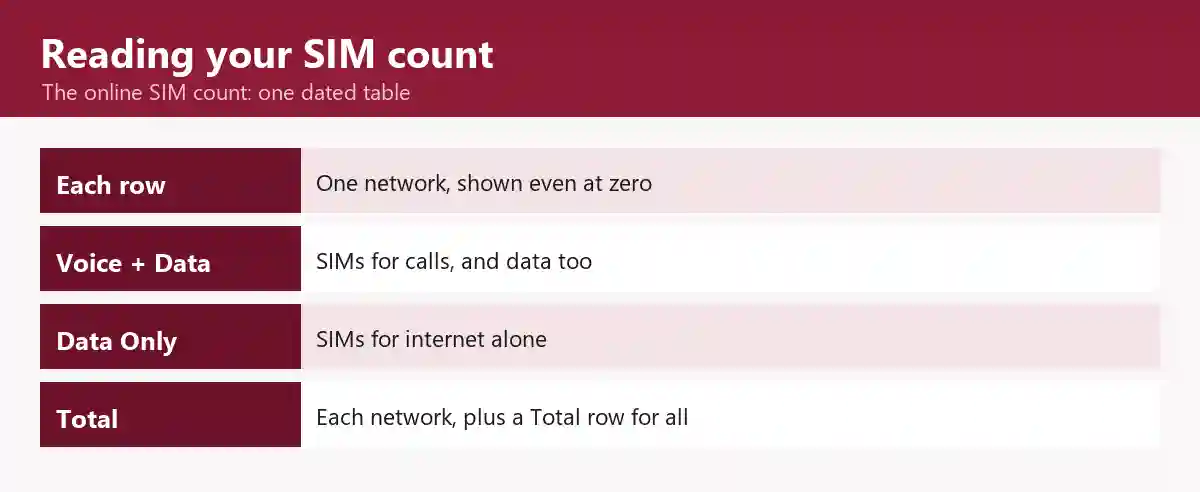
One row per network, zeros included
The table served on 30 August 2026 was dated, listed Jazz, Telenor, Ufone and Zong with a figure against each, zeros included, and added a Total row beneath them; a zero means no SIM from that network is registered against the CNIC. Because the table prints the date it was generated, a screenshot of it is a dated record of your count to take to your network’s counter.
The three columns: Voice + Data, Data Only and Total
Voice + Data SIMs are SIMs that make calls and also use data, Data Only SIMs carry internet data alone, and Total SIMs adds the two for each network. Which figure to set against the cap is under the 8-SIM limit.
How to check all SIM numbers on ID card?
Neither 668 nor cnic.sims.pk lists them: the result carries no phone numbers, owner names or addresses. The number on your ID card is your CNIC, and the portal’s result labels it “ID Card Number”. Each SIM’s own number has to come from that SIM itself.
Where each missing piece is
- The number of the SIM in your phone: its network’s own-number code, at SIM number check code for every network.
- Whose CNIC a SIM you hold sits on: text MNP to 667 from that SIM, and the network’s reply gives its registered name and a part-masked CNIC; some replies also carry the activation date (the MNP-to-667 reply, field by field).
- What the record holds, field by field: CNIC SIM check: what the official record shows.
- Someone else’s number: no website or app can show who owns a phone number (see what a mobile number can and cannot reveal); why sites that promise a name fail is covered in lookup sites that promise a name for a number.
The 8-SIM limit on one CNIC
How many SIMs per CNIC?
Eight, for personal use: PTA’s FAQ allows five voice SIMs and three data SIMs on one CNIC, whichever networks they are on. Compare the Total on your result with eight; within that cap, the five voice and three data places are separate allowances, so an unused data place does not make room for a sixth voice SIM.
Where five and three come from
The split dates from a Supreme Court order of 5 November 2015: a three-judge bench headed by Chief Justice Anwar Zaheer Jamali, hearing a petition by China Mobile, Zong’s parent, allowed three data-only SIMs per person on top of the five-SIM limit already in place for voice (Dawn, 6 November 2015). The court asked PTA to review the order within three months and let it raise the data-only number itself; PTA’s FAQ carries the result. Six matches neither the five-SIM limit before that order nor PTA’s current figure.
When the count looks wrong
Set the count against the SIMs you can name, network by network; a gap usually has one of four common causes.
- List every SIM you hold.
- Set each one against its network’s row in the result.
- The network showing more SIMs than you can name is where the unexplained one sits.
A data SIM you forgot
A SIM bought for internet use alone is still a SIM on your CNIC and counts toward your Total.
A relative’s SIM on your CNIC
A SIM a relative uses is counted against your CNIC, not theirs, and stays in your count until it leaves your CNIC, for example through a change of ownership to theirs; what that means for you in the meantime is set out in PTA’s own-name and liability advisories. That change is made at your network’s counter and explained in SIM ownership transfer at the counter.
A SIM you disowned still shows
Until a disowned SIM drops off the count, any slip or reference the outlet gave you is your record of the disowning. For a number ported to another network, PTA’s MNP guidelines make PMD responsible for updating the 668 data once the port completes. If it still shows when you check again, take that record back to the outlet that did the disowning.
A SIM you never bought
A SIM registered on your CNIC without your knowledge shows up only as a figure you cannot account for, and PTA’s advice of 31 December 2025 is to contact that network immediately. The steps for taking it off your CNIC are in disowning a SIM you never bought.
At or over the limit: the next step for each count
What you do next depends on where your Total stands and whether you can account for every SIM in it.
| Your count | What it means | Next step | Where the detail is |
|---|---|---|---|
| Total under eight, every SIM accounted for | Nothing needs doing | None | Not needed |
| Total at eight | The cap is reached (see the 8-SIM limit): no further SIM until one leaves your CNIC | Disown a SIM you no longer use at its network’s outlet (your network’s counter) | The disowning steps, the charge and the lock on newly activated SIMs |
| Total above eight, or above the SIMs you can name | At least one SIM needs explaining | Work through the four common causes | When the count looks wrong |
Your network’s counter: where a SIM is dealt with
The count names the network; that network’s authorised outlet is where a SIM on your CNIC is disowned or moved to another CNIC, in person, after a fingerprint check against NADRA (BVS). How that check works is explained in how a SIM is registered and verified at the counter, a print that does not match in when biometric verification fails, and finding a genuine outlet in find your operator’s genuine franchise.
Questions people ask about the SIM count
Can I check SIMs registered on my CNIC?
Yes, and PTA recommends it: its release of 31 December 2025 encourages users to verify the SIMs registered against their CNIC and advises keeping only the SIMs they need and actively use. Checking the count is how you confirm that; the steps are under how to check SIMs on your CNIC.
How do I check the active SIM on my ID?
With the ordinary SIM count: the table cnic.sims.pk returns has no column for SIMs in use, so a SIM kept as a spare is counted the same as the one in your phone, as long as it is registered against your CNIC. To tell your SIMs apart by number, see How to check all SIM numbers on ID card?
Roman Urdu mein: ek CNIC par kitni SIM ho sakti hain
PTA ke FAQ ke mutabiq ek CNIC par zyada se zyada 8 SIM ho sakti hain: 5 voice aur 3 data, chahe woh kisi bhi network ki hon. 668 aur cnic.sims.pk se apne CNIC par SIM check karne ke qadam SIM check karne ka poora tarika Roman Urdu mein par diye gaye hain.
Where the facts on this page come from
| Fact | Source | Date on the source |
|---|---|---|
| The two routes | PTA FAQ on counting the SIMs on a CNIC | No date printed |
| The cap of eight, five voice and three data | PTA FAQ on how many SIMs a CNIC may hold | No date printed |
| What the 668 reply contains | PTA release on the SIM Information System 668 | No date printed |
| The October 2009 introduction | PTA release on the facility for overseas Pakistanis | No date printed |
| Rs 2 per SMS at launch; no dashes or spaces | PTA release on the launch at the PTA Consumer Forum | No date printed |
| “Charges apply” after 668 only | PTA notice on the SIM disowning charge | 10 Nov 2023 |
| “Charges may apply”; the encouragement to verify and to keep only needed SIMs; the advice for a SIM issued without consent | PTA release on responsible SIM registration and usage | 31 Dec 2025 |
| The portal’s tabs, field rules, reCAPTCHA, Foreign ID wording and absence of any fee or location condition | cnic.sims.pk | Live page; no date printed |
| The result table | cnic.sims.pk result | Served 30 Aug 2026 |
| The MNP text to 667 and PMD’s update of the 668 data after a port | PTA MNP Porting Process Guidelines, version 7.9.15 | No date printed |
| The fingerprint check against NADRA, authorised outlets, disowning and change of ownership as fingerprint transactions | PTA page on biometric verification | No date printed |
| The 2015 order, its bench, petitioner and review clause | Dawn | 6 Nov 2015 |
| Section 16 | PECA 2016, Act XL of 2016 (Pakistan Code consolidated text) | 18 Aug 2016 |
Reviewed by Muhammad Zayan.
Keep reading
To prove that one particular SIM is in your name, see SIM ownership check: proving a SIM is yours, and for PTA’s dated rule changes, the 2026 PTA SIM rules timeline. Transfers, blocks and a monthly routine for your CNIC are in the SIM safety and problems guide.
← SIM owner details in Pakistan: the official checks, from the top