
Own-SIM checks only · Reviewed 29 September 2026
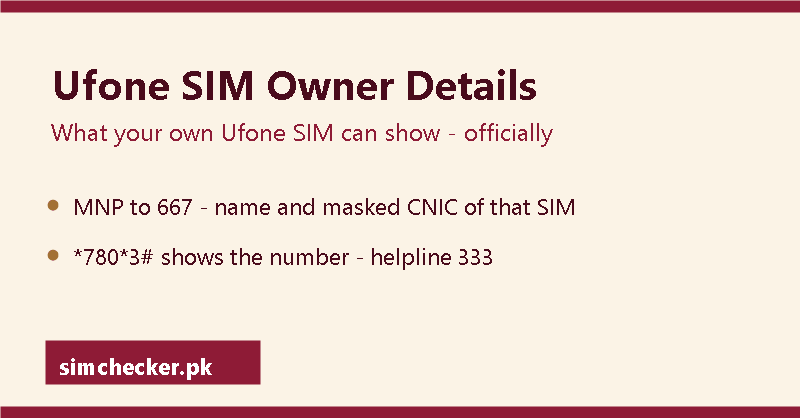
You can check the owner details of the Ufone SIM in your own phone: send MNP to 667 from it and the reply names the person it is registered under, and dial *780*3# to see its number. No code, app, helpline or website shows the registered owner of a Ufone number that is not in your hand. Below: your CNIC’s Ufone SIM count, the *336# menu, the helpline and app, ownership, new numbers and Ufone in 2026.
Can you check Ufone SIM owner details?
On Ufone, owner details come down to the name a SIM is registered under, and that name comes from the 667 name check, a text message; the dial codes on this page answer other questions about the line. The same checks for every network sit side by side in sim owner details in Pakistan: the official checks.
How do I check my mobile SIM?
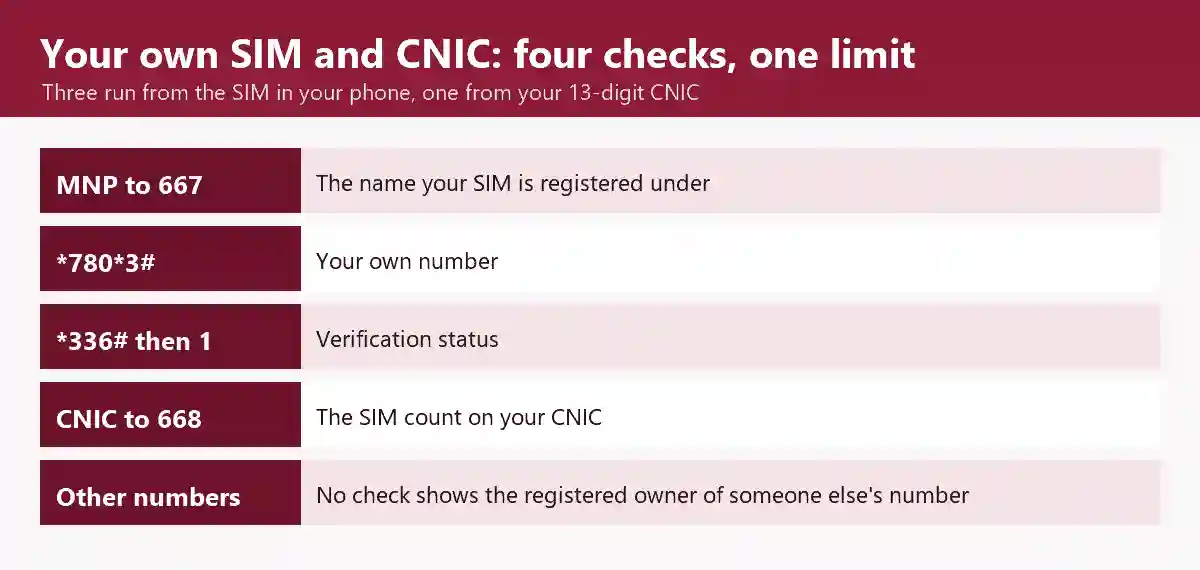
Each check answers one question, about the SIM in your phone or about your own CNIC, so start from the question you have about your own line. The table of checks on this page pairs each question with its route and the section that explains it.
| You want to know | Ufone route | What comes back | Section |
|---|---|---|---|
| Your Ufone SIM’s registered name | MNP to 667, sent from that SIM | The registered name | 667 name check |
| Your own Ufone number | Dial *780*3# | Your number | Number code |
| The SIM’s verification status | Dial *336#, then type 1; a second menu may follow | Its verification status | Verification |
| Balance, usage and subscriptions | The UPTCL app | Your account details | App |
| How many Ufone SIMs your CNIC holds | Your 13-digit CNIC to PTA’s 668 | The SIM count on your CNIC | CNIC count |
| Anything else about your own line | 333 from a Ufone line; 033-11-333-100 from a landline | A Ufone helpline agent | Helpline |
| The registered owner of a Ufone number not yours | No code, app, helpline or site | Not available | Another number |
Ufone SIM owner name check: MNP to 667 from the SIM itself
Ufone’s port-in page lists four items in the 667 reply: the mobile number, the name it is registered under, the CNIC and the field Ufone calls SIM Number. The CNIC arrives part-masked. The port-in page gives no price; ProPakistani’s Ufone guide describes the message as charged, so the SIM needs credit. A name that is not yours means the line sits on another CNIC; see Ufone SIM ownership transfer.
Sending the text, each reply field, the activation date some replies carry and porting are covered in MNP and the 667 reply, field by field.
What is a SIM number?
In everyday use, “SIM number” means the mobile number a SIM carries, the one the Ufone SIM number check code shows. The field Ufone’s list of the 667 reply calls SIM Number is different: PTA’s porting guidelines name it the IMSI, which PTA’s numbering plan spells out as the international mobile subscriber identity.
Ufone SIM number check code: *780*3#
*780*3# is the Ufone SIM number check code, a USSD code: dialled from a Ufone SIM, it shows that SIM’s number on screen, free and at zero balance, as PhoneWorld’s Ufone guide (updated 21 July 2026) documents. Every network’s own-number code, with the grade each carries (community-confirmed for Ufone), is listed under SIM number check code for every network.
How to check SIM number of Ufone?
Dial *780*3# from the Ufone SIM, from the right slot on a two-SIM phone, and read the number on screen. If it does not answer, dial *1#, the second code the same guides give. If neither answers, try the online route described on this page or call the 333 helpline.
Ufone number check karne ka tarika
Ufone number check karne ke liye Ufone SIM wale slot se *780*3# dial karein. Ufone SIM ka number screen par aa jata hai, balance ke baghair bhi. Yeh code na chale to Ufone ke baqi tarike Roman Urdu mein SIM check karne ka poora tarika par hain.
How many Ufone SIMs are on your CNIC: PTA’s 668 count
The count of Ufone SIMs on your CNIC comes from PTA’s 668 service; running it and reading its Ufone line are covered in how many SIMs are on my CNIC. That count is measured against the 8-SIM limit, five voice and three data. If the count shows a Ufone SIM you did not take, see disowning a SIM you never bought.
Ufone SIM verification status: the *336# menu PTA lists
Dial *336# from the Ufone SIM and type 1 when the menu appears: PTA’s verification-status listing says the reply gives the verification status of that number, and PhoneWorld’s guide (updated 29 January 2021) adds a second menu whose first option, pressed as 1 again, is the biometric verification status. PTA’s listing prints no date, so Ufone’s menu may run differently today.
When a SIM needs verifying again, see verifying an existing SIM again at the counter. The longer string *336*1*2# is not on PTA’s listing.
Someone else’s Ufone number: caller names versus the registered owner
Kaun Hai, a paid caller-name subscription Ufone has offered on *406#, flashes the name of an incoming caller when its database holds one, and the terms on Ufone’s 2025 page for the service say that data comes from a global database, not from Ufone’s customer database, so it shows a caller name, not the registered owner of the number. Ufone’s general terms keep all customer information confidential unless a government department or agency requires its disclosure or the customer agrees to it.
A 033 number began in the range PTA gave Ufone in its 2008 numbering plan, but see why a number’s prefix no longer names its network; 76367 names the network a number is on today (what a 033 prefix and 76367 can tell you). What NADRA keeps and what it releases are covered in SIM owner details by NADRA.
Obtaining, selling, possessing, transmitting or using another person’s identity information without authorisation is an offence under PECA 2016, section 16. Harassing or scam calls go to the fraud and harassment reporting route, and sites that claim to name the owner of any number are examined separately.
Ufone helpline, UPTCL app and service centres
Ufone’s helpline is 333 from a Ufone line and 033-11-333-100 from a landline, answered 24 hours a day; the same customer-care page gives [email protected] and a WhatsApp chat button (0331-1333100).
UPTCL, Ufone’s self-care app for Ufone and PTCL accounts (published by Pak Telecom Mobile Limited), signs in with your Ufone number and a one-time password and shows your balance, usage, subscriptions and their expiry. Install it only from the Google Play or App Store listing linked on ufone.com/uptcl.
For a counter visit, see finding a genuine Ufone franchise. A lost, stolen or PUK-locked Ufone SIM is handled in blocking a lost SIM and opening a blocked one.
How can I check my Ufone SIM number online?
Online, the route is Ufone’s self-care app, UPTCL: after sign-in, its profile shows your registered Ufone number, as PhoneWorld’s Ufone guide (updated 21 July 2026) describes. How to sign in and where to install it are in the UPTCL paragraph on this page.
Ufone SIM ownership transfer and new Ufone numbers
A Ufone SIM changes owner at a Ufone service centre or franchise, where the change is confirmed by fingerprint against NADRA. Ufone’s own change-of-ownership page covers only the SIM of a holder who has died (transferring a deceased holder’s SIM, network by network); for two living people, an owner abroad or a company number, see moving a SIM into your own name, step by step.
How to get a Ufone number?
Book one on Ufone’s number booking page: search four to seven digits, and the number you pick is held for five days, for collection at a Ufone business centre, franchise or retailer, or for delivery. Its holder must bring an original CNIC and be present for activation; a prepaid SIM starts from Rs 200.
Ufone in 2026: PTML, Telenor, Onic and the e& rebrand
Ufone, styled Ufone 5G on its website ufone.com, is the mobile brand of Pak Telecom Mobile Limited (PTML); a proposed rename was still awaiting a government decision in mid-September 2026, and the table dates each step.
| Date | What happened | Source |
|---|---|---|
| 11 Aug 2023 | PTML owns the Ufone brand and is launching Onic as another digital product | PTA clarification |
| 1 Jul 2026 (PTCL release) | Telenor Pakistan amalgamates into PTML, PTCL’s wholly owned subsidiary, with effect from July 2026; Telenor’s July 2026 merger into PTML | PTCL press release |
| 4 Sep 2026 (reported) | PTA conditionally approves rebranding the merged operator as e&, subject to legal formalities | ProPakistani |
| 11 Sep 2026 | PTA orders PTML to stop new Onic connections; what PTA’s September order means for Onic customers | Dawn, 15 Sep 2026 |
| 14-15 Sep 2026 (reported) | The Privatisation Commission stops PTA’s approval; Pakistan’s and the UAE’s governments are to decide | ProPakistani; Dawn |
Other Ufone codes people ask about
What is the code *141 in Ufone?
ProPakistani’s packages page (updated 22 June 2026) lists *141# as the subscription code for Ufone’s Nayi SIM Double Offer, dialled from an eligible Ufone SIM. Ufone’s own current new-SIM offer page gives *1000#, whose no-charge offer can be taken once, within the first 30 days after the SIM’s biometric verification.
What is *706 in Ufone?
*706# shows the resources left in your Ufone bundle, such as remaining data, as Ufone’s own offer pages state. For the main balance and its expiry date, PhoneWorld’s balance guide (updated 29 June 2026) gives *124#, which it says costs Rs 0.12 plus tax per inquiry.
Where the facts on this page come from
| Item and value | Source | Date on source |
|---|---|---|
| 667: the trigger, the reply format, and the SIM Number field named IMSI | PTA MNP Porting Process Guidelines V7.9.15 | 13 Feb 2020 |
| IMSI spelled out: international mobile subscriber identity | PTA National Numbering Plan | 2008 |
| 667 reply on Ufone: mobile number, name, CNIC, SIM Number field | ufone.com port-in page | undated |
| 667 is charged, so the SIM needs credit | ProPakistani Ufone guide | 29 Jan 2020 |
| *780*3# at zero balance; *1#; “SIM number check code” for the code that shows the phone number; the app profile shows the number | PhoneWorld Ufone guide (and ProPakistani for both codes) | updated 21 Jul 2026; ProPakistani 29 Jan 2020 |
| 333 from a Ufone line; 033-11-333-100 from a landline; 24 hours; [email protected]; WhatsApp chat button (0331-1333100) | ufone.com customer-care page | undated |
| UPTCL sign-in by number and one-time password; features; the two store links | ufone.com/uptcl | undated |
| UPTCL on Google Play, Pak Telecom Mobile Limited | Google Play listing | updated 7 Aug 2026 |
| UPTCL on the App Store, Pak Telecom Mobile Limited | App Store listing | version of 19 Sep 2026 |
| *336#, then 1: verification status (the listing does not carry *336*1*2#) | PTA verification-status listing | undated |
| *336#, then 1, then a second menu whose first option is the biometric verification status | PhoneWorld verification-status guide | updated 29 Jan 2021 |
| 668: PTA’s count of the SIMs on a CNIC | PTA FAQ on the SIM count | undated |
| 033 assigned to Ufone | PTA National Numbering Plan | 2008 |
| Customer information kept confidential unless a government department or agency requires it or the customer agrees | ufone.com General Terms & Conditions | undated |
| Kaun Hai on *406#: an incoming caller’s name from a global database, not Ufone’s customer database | ufone.com Kaun Hai page, archived copy and PhoneWorld’s report of the same service | © 2025 on the page (archived 16 Oct 2025); PhoneWorld updated 15 Jul 2022 |
| 8 SIMs per CNIC, five voice and three data | PTA FAQ on the SIM limit | undated |
| Change of ownership needs fingerprint verification against NADRA | PTA biometric verification page | undated |
| Change-of-ownership page covers a deceased holder only | ufone.com change-of-ownership page | undated |
| Number booking: 4-7 digits, held five days, original CNIC, holder present; prepaid SIM from Rs 200 | ufone.com/BMN | undated |
| PECA 2016 s.16: the offence, named | Pakistan Code, Act XL of 2016 | consolidated text |
| PTML owns Ufone; Onic as a second PTML product | PTA clarification | 11 Aug 2023 |
| Telenor into PTML with effect from July 2026; PTML a wholly owned PTCL subsidiary | PTCL press release | 1 Jul 2026 |
| e& conditional approval | ProPakistani | 4 Sep 2026 |
| e& approval stopped; decision for the two governments | ProPakistani; Dawn | 14 Sep 2026; 15 Sep 2026 |
| Onic order of 11 Sep 2026 | Dawn | 15 Sep 2026 |
| *706#: remaining bundle resources | ufone.com offer pages | undated |
| *141#: Nayi SIM Double Offer | ProPakistani packages page | updated 22 Jun 2026 |
| *1000#: Nayi SIM Offer; the no-charge offer once, within 30 days of BVS | ufone.com Nayi SIM Offer page | undated |
| *124#: balance and expiry, Rs 0.12 plus tax per inquiry | PhoneWorld balance guide | updated 29 Jun 2026 |
Reviewed by Muhammad Zayan on 29 September 2026.
Where to go next
Also in this section: Jazz SIM owner details, Zong SIM owner details, Telenor SIM owner details and Onic and SCOM SIM owner details; SCOM is SCO’s network, not Ufone’s. The hub keeps every network’s own-number code on one page.
← sim owner details in Pakistan: the official checks, from the top