
Own-SIM checks only · Reviewed 29 September 2026 · Each Zong check, helpline and price on this page, with its source
Zong SIM owner details for a SIM you hold come back by text: send MNP to 667 from that Zong SIM, and Zong replies with the name it is registered to. No Zong code, helpline or app reveals the registered holder of a Zong number that is not in your hand, and *8#, the Zong SIM number check code, returns only the number of the SIM that dials it. Further down: the data-device and My Zong routes, your CNIC’s SIM count, PTA’s 7911 listing, Zong’s channels and prices, ownership transfer, and the limits on someone else’s number, each sourced below.
Zong SIM owner details: which Zong check answers which question
What are the codes of Zong?
For a Zong SIM you hold, two checks run from the SIM itself, *8# and MNP to 667, and PTA’s legacy listing for CMPak also names V to 7911; the table below sets out what each returns and costs. The count of SIMs on your CNIC comes from PTA (see SIMs on your CNIC), and 310 is Zong’s helpline.
| You want to know | Route | What comes back | Cost |
|---|---|---|---|
| The number of the Zong SIM in your hand | Dial *8# from it; for a data-device SIM, see the MBB routes | That SIM’s own number | No balance needed |
| The name a Zong SIM is registered to | MNP to 667 (how to send it) | The registered name and a part-masked CNIC; some replies add the activation date; no address | Charges may apply |
| Whether your Zong SIM is biometrically verified | V to 7911, from PTA’s legacy listing for CMPak (see whether it still replies) | Verification status, as that listing describes it | Free, per the listing |
| Who a Zong number that calls you is registered to | Not a check your own SIM can run: see a stranger’s Zong number | – | – |
Other networks’ codes are in the SIM number check code for every network table, and the networks sit side by side in sim owner details in Pakistan: the official checks.
Zong SIM owner name: MNP to 667 from the SIM in your hand
For a Zong SIM, the reply to MNP sent to 667 comes from Zong’s own records, not from PTA: the text is a service PTA’s porting guidelines require every operator to answer for the SIMs on its network.
How to check Zong sim owner detail?
Put the Zong SIM in your phone, type MNP as a new text message and send it to 667 from that SIM. Zong’s reply arrives by SMS on the same SIM, and the table above shows what it carries. If no reply comes, call 310 from the same SIM.
If the reply names someone else, moving the SIM into your name is covered under Zong SIM ownership transfer and what the registered holder answers for in PTA’s own-name and liability advisories; the 667 reply field by field, its reply window and how porting uses it are on the MNP page.
Zong SIM number check code: *8#, the MBB routes and My Zong
What is the Zong SIM number check code?
*8# is the code Pakistani how-to guides give for Zong phone lines (ProPakistani, 29 January 2020; PhoneWorld, 22 April 2021). Zong’s own device guide prints it only for its data SIMs, as the last of the routes below, so for a phone line the code rests on those two guides.
Dialling works as on any network: what happens when you dial an own-number code.
Older Zong strings: *2# and *100#
ProPakistani’s 2020 guide and PhoneWorld’s 2021 update also list *2# as a fallback and *100# as a second string for the same check. Both rest on those dated guides, so they appear here as history, not as working codes.
Zong MBB and device SIM number: *6767#, 192.168.8.1, then *8# in a handset
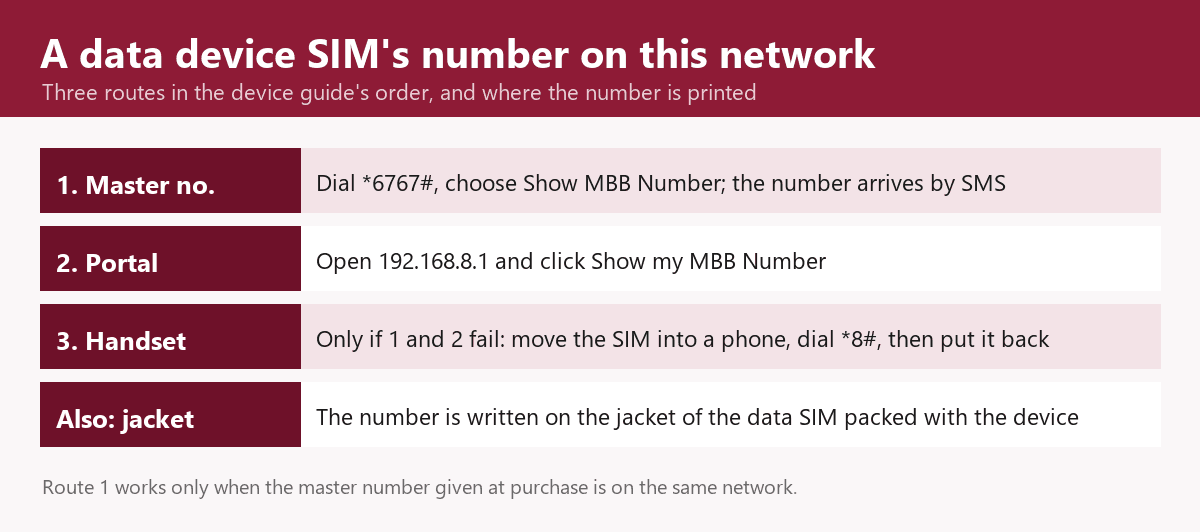
A Zong data-device (MBB) SIM has a number of its own, and Zong’s device guide gives the routes to it in this order: *6767# from the Zong master number, then the device portal at 192.168.8.1, and only if both fail, the MBB SIM moved into a phone to dial *8#.
The master number is the one given at purchase; *6767# works only when it is a Zong line, and the Show MBB Number reply arrives on it by SMS. Zong also states, separately, that an MBB SIM’s number is written on its SIM jacket; if the jacket is lost, take the device to a Zong service centre or franchise, or call 310 from your Zong number.
My Zong app: your own numbers, balance and seven days of usage
My Zong signs you in with your Zong number, entered without the leading zero, and a PIN sent to it by SMS; inside, balance and free-resource checks cost nothing, up to five Zong numbers can be linked, and calls, SMS, internet and bundles are listed for the last seven days. Only the account’s authorised default user sees the complete usage details. The app is free, though internet charges apply, and the registered number’s tax certificate downloads from it.
Zong SIMs on your CNIC: counted by PTA’s 668 service
PTA’s 668 service counts the Zong SIMs on your CNIC; running it and reading its Zong line are covered in how many SIMs are on my CNIC. Zong has no allowance of its own: the 8-SIM limit on one CNIC covers every network together. An unwanted Zong SIM is removed by disowning a SIM you never bought, and Zong is among the operators in PTA’s July 2026 fines over SIMs issued without consent.
Zong SIM verification status: PTA’s 7911 listing for CMPak
How can I check my Zong SIM status?
PTA’s legacy verification-status listing names a 7911 service for CMPak, the company behind Zong, reached by sending V to 7911 from the SIM; no current PTA or Zong page confirms that the service still replies. During the 2015 re-verification drive, ProPakistani gave *6622# for the same Zong check (25 February 2015).
Verification itself, and how a SIM is verified again, is covered under biometric verification at the counter.
Zong helpline 310 and Zong’s other contact channels
Zong publishes the contact channels below, with what each is for and, where Zong states one, its cost; for a question about your own line, 310 dialled from the Zong SIM is the first call.
| Channel | Number or address | Use it for | Cost |
|---|---|---|---|
| Helpline call | 310 from a Zong SIM, 24/7 | IVR self-service, then an officer, for your own line | Rs 2 + tax per call connected to an officer |
| Helpline SMS | Type help and send it to 310 | Product information | Free |
| UAN | (051) 111-222-111 | Access to the same helpline by an ordinary call | Normal package charges |
| Complaint portal | complaint.zong.com.pk | A written complaint | – |
| My Zong live chat | Inside the My Zong app | Account questions in writing, with 24/7 staff; complaint registration and status | As for the app (see My Zong above) |
Zong SIM price: what Zong’s own price list charges
Zong’s price list charges Rs 300 for a new prepaid SIM, Rs 300 for a data SIM and Rs 400 for a change of SIM; a new postpaid SIM is Rs 300 plus a security deposit set by its tariff. Zong’s eSIM price is in eSIM prices by network and its process under Zong eSIM, and what bringing a number over from another network involves, Zong’s MNP helpline included, is under porting a number to Zong.
Zong SIM ownership transfer: what Zong’s terms add
Zong’s terms run a change of ownership through its new-SIM procedure, a fingerprint check against NADRA; its price list (Zong SIM prices) has no line for it.
Who attends, any fee and the visit itself are in the transfer visit step by step, and the rules that can stop it; a deceased or overseas holder in when the registered holder has died or is abroad; and a lost SIM in blocking a lost Zong SIM.
A stranger’s Zong number: Caller Name versus the registered holder
Zong Caller Name, a paid daily subscription for prepaid lines started with *254#, shows an unknown caller’s name when its crowd-sourced database holds one; Zong’s terms say that data is not from its customer database, so the name is a crowd-sourced label, not the registered holder.
Zong’s terms keep customer information confidential unless a government department or agency requires it or the customer agrees, so Zong does not release another subscriber’s registered name and CNIC, address or location to other customers. Using another person’s identity information without authorisation is an offence under PECA 2016 section 16.
Report a harassing or fraudulent number through the fraud and harassment reporting route. What a number reveals is in what a Pakistani number can tell you, and a SIM’s location in what a SIM tracker can and cannot follow. Sites and apps promising more are examined in the lookup sites and apps that promise owner details, and NADRA’s part in what NADRA holds and does not show.
Zong SIM check karne ka tarika: apna number aur SIM kis ke naam par hai
Apni Zong SIM ka number check karne ka code *8# hai: usi SIM se dial karein. Zong SIM kis ke naam par hai, yeh usi SIM se MNP likh kar 667 par SMS karne se pata chalta hai. Apne CNIC par kitni Zong SIM hain, yeh aur baqi har check SIM check karne ka tarika wale page par hai.
Questions people ask about Zong numbers
Is 0370 a Zong number?
Yes. Zong’s Book Your Number portal offers new numbers in the 0370 and 0371 series alongside 0310 to 0319, and 031 is the range PTA’s 2008 numbering plan gave Paktel GSM, which China Mobile bought in 2007 and renamed CMPak. A ported number keeps its prefix, so a number’s current network is shown in which network a number is on today.
How do I get a new Zong SIM number?
Book one free on Zong’s Book Your Number portal, open to customers of other networks too, and collect it within three days from a Zong service centre with your original CNIC; or buy a SIM at an outlet found through Zong franchise near me. Either way it is registered to your CNIC in person: see how a new SIM is registered at the counter; its price is in Zong SIM prices.
Is a SIM number a phone number?
In everyday use it is, and what a SIM number is also covers the term’s second, technical sense in PTA’s porting rules.
Where the facts on this page come from
| Fact | Source | Date on source |
|---|---|---|
| Own-number code on phones; the everyday sense of SIM number | ProPakistani Zong guide; PhoneWorld Zong guide | 29 Jan 2020; updated 22 Apr 2021 |
| Older own-number strings | The same two guides | As above |
| MBB number routes, master number, SIM jacket, lost jacket | Zong MBB FAQ | Undated |
| My Zong app | Zong, My Zong app page | Undated |
| The 667 text, its reply format, and a ported number keeping its operator code | PTA, MNP Porting Process Guidelines V7.9.15 | 13 Feb 2020 |
| The 667 charge on Zong | PhoneWorld Zong guide | Updated 22 Apr 2021 |
| 668 as PTA’s count | PTA FAQ on counting SIMs registered against a CNIC | Undated |
| The 7911 listing for CMPak | PTA, how to check verification status of your SIM/CNIC (legacy page) | Undated |
| The 2015 Zong status string | ProPakistani | 25 Feb 2015 |
| Helpline, SMS help, UAN, their charges, complaint link | Zong contact page | Undated |
| Zong SIM prices | Zong SIM price list | Undated |
| Change-of-ownership procedure; confidentiality of customer information | Zong, PTA terms and conditions | Undated |
| Zong Caller Name: who can use it and where its names come from | Zong Caller Name page | Undated |
| Number series 0310 to 0319, 0370 and 0371; booking and collection terms | Zong Book Your Number | Undated |
| The 031 range | PTA, National Numbering Plan 2008 | 2008 |
| Paktel to CMPak | Dawn | 19 May 2007 |
| CMPak and China Mobile | Zong, China Mobile Pakistan page | Undated |
| PECA 2016 section 16, the offence | Pakistan Code, Act XL of 2016 | 2016 (consolidated text) |
| Zong among the operators fined in July 2026 | Business Recorder | 15 Jul 2026 |
Reviewed by Muhammad Zayan on 29 September 2026.
Where to go next
For SIMs on other networks, every network’s own-number code on one page lists each code with its grade, and the same owner checks are set out in the guides for Jazz SIM owner details, Telenor, Ufone, and Onic and SCOM.
SIM owner details in Pakistan: the official checks, from the top