
Own-CNIC checks only · Reviewed 29 September 2026 · Onic and SCO’s own published routes
For your own Onic SIM, the route to the registered name is a text reading MNP sent to 667 from that SIM; for a SCOM line, questions about its registration go to SCO’s helpline and other contact routes. No code, app or website names the person behind someone else’s Onic or SCOM number.
Onic SIM owner details: the name registered to your own Onic line
Onic’s own steps placed the biometric check at the pickup location where a physical Onic SIM was collected, so the name on such a line is the name of the person whose fingerprints were matched there.
Every network’s own guide is listed in SIM owner details by network. Under Onic’s own port-in steps, the request to move a number to Onic from another network went to PTML’s porting code. Biometric matching in general is explained in how the fingerprint check at the counter works.
How to check Onic SIM ownership?
Send MNP as a text to 667 from the Onic SIM itself. Onic’s numbers are held by PTML, and PTML is one of the operators PTA’s porting rules require to answer that text. How to read the reply is set out in the 667 reply, field by field.
If no reply arrives, Onic’s support routes are the next step. If the line turns out to be registered in someone else’s name, the fix starts with moving a SIM into your own name.
Onic SIM number check: where your number, balance and package show
Onic publishes no USSD codes for account management, so none for your number, your balance or your package, and says generic network codes may partly work on its lines but are unsupported and can return wrong figures.
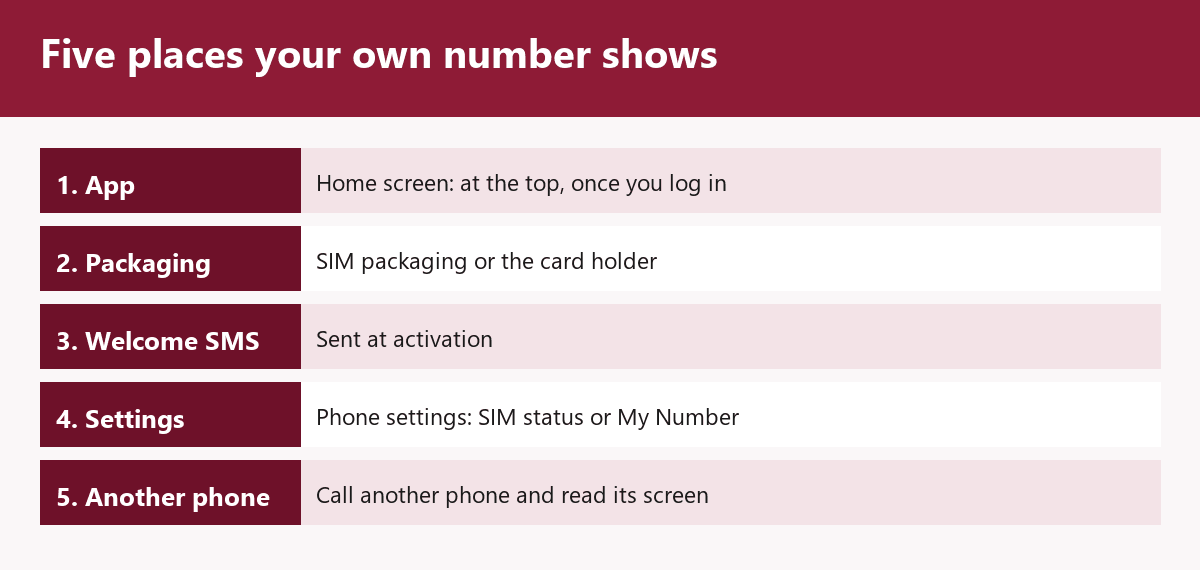
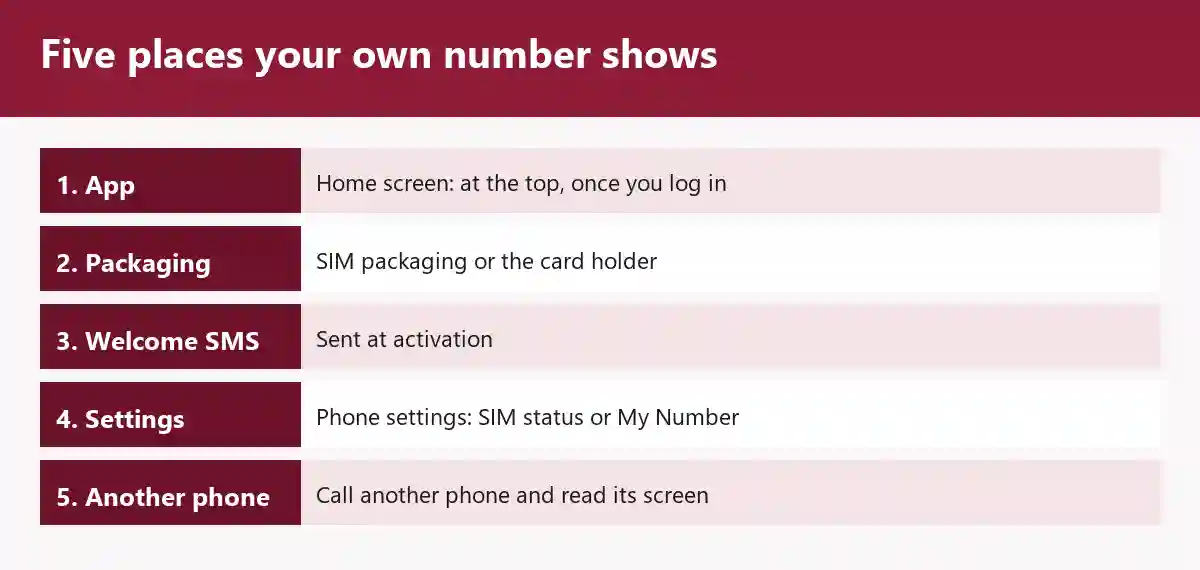
In the Onic app, your number sits at the top of the home-screen dashboard as soon as you log in.
How to check Onic SIM number without app?
Onic lists four other places: call a friend or family member, which needs credit on the SIM, and read your number on their screen; the SIM packaging or the card holder the SIM came in; the welcome SMS Onic sent when the SIM was activated; and the phone’s own settings, under SIM Status on Android or My Number on iPhone.
Onic balance, data and package in the app
Remaining balance, data, minutes and SMS all show on the Onic app’s home screen after login, with data as a ring or progress bar and the active plan as a card showing its days left. Tap the plan card for the full allowance and expiry; for a dated breakdown, go to Dashboard, then Usage Logs, choose Data, Voice or SMS and a time period, tap Get Logs, and the report arrives at your registered email.
Every other network’s own-number code, with who publishes it, is on SIM number check code for every network.
Onic after PTA’s order of 11 September 2026
PTA’s order of 11 September 2026 directs PTML to stop issuing new Onic SIMs and eSIMs, activating new Onic connections and taking new subscriptions, and to move existing Onic customers to PTML within three months.
PTA found that Onic’s separate branding, packages, app, billing and customer management systems make its business model similar to that of a mobile virtual network operator (MVNO). PTML’s alternative is to obtain an MVNO licence and keep marketing Onic as a separate entity. Before Onic’s launch, PTA said in August 2023 that it was a digital product of PTML, which already owned the Ufone brand, and that no new operator had been licensed; how Ufone and Onic now sit under PTML is covered in Ufone SIM owner details.
Onic says existing customers can keep using its services without disruption. Questions on how a number, balance or package carries across to PTML go to the Onic support routes listed below.
The order sits with the year’s other decisions in every PTA SIM rule and order of 2026, in date order.
Onic helpline and other contact routes
Onic lists no WhatsApp number among its support routes.
| Route | Details |
|---|---|
| Helpline | 051-111-339-111 |
| [email protected], with a reply within one working day | |
| Chat | In the Onic app or on onic.pk, open 24/7 |
| Social inboxes | Facebook Messenger and Instagram |
SCOM SIM check: what SCO publishes for its own lines
What is SCOM SIM?
SCOM is the mobile service of SCO, the Special Communications Organization, which serves Azad Jammu & Kashmir and Gilgit-Baltistan and also runs the SNET internet service and the S-Paisa mobile financial service there. PTA’s National Numbering Plan gives SCO the network code 35, so SCO-issued numbers begin 035.
The number details guide explains what a number’s prefix does and does not tell you.
SCOM SIM number check code: what SCO lists
SCO publishes no code that shows the number or the name on a SCOM line.
| SCO’s label | Dial |
|---|---|
| Balance query, prepaid and postpaid subscribers | *125# |
| Free minutes and bundle query | *125#, then reply 1 |
| Package activation/change | *725#, or dial 725 |
| SCOM Loan, against a service charge | *135# |
SCOM helpline and contact routes
SCO’s helpline is dialled from the SCOM number itself and answers round the clock.
- Helpline: 355
- UAN: 111-726-726
- WhatsApp self-service: 0355-4275726
- Complaints by email: [email protected]
The name on a SCOM line and the 667 text
The MNP text to 667 is not a documented check for a SCOM line: SCO has no code in PTA’s list of porting operators, and number series allocated to AJK cannot be ported under the AJK condition in PTA’s porting rules.
SCO lists its own customer service centres and franchises; the addresses are on SCOM customer service centres in AJK and Gilgit-Baltistan.
Onic and SCOM lines in your CNIC count
A CNIC check counts the SIMs registered to your CNIC, operator by operator, and never lists their numbers or the names on them.
Send your 13-digit CNIC by SMS to 668 or enter it at cnic.sims.pk; the steps, what each route costs and how to read the result are on how many SIMs are on my CNIC.
Checking someone else’s Onic or SCOM number
Both official checks answer only for what they are run on: the MNP text reads only the SIM it is sent from (how the 667 check works), and a CNIC count covers only the CNIC entered.
Using another person’s identity information without authorisation is an offence under section 16 of PECA 2016. A number that is troubling you goes through the fraud and harassment reporting route. Sites that promise a name behind a number are taken apart in what the lookup sites actually hold.
Where to go next
For a line on another network, read Jazz SIM owner details, Zong SIM owner details or Telenor SIM owner details, and for Urdu readers there are the same checks in Roman Urdu.
SIM owner details in Pakistan: the official checks, from the top
Where the facts on this page come from
PTA’s order of 11 September 2026, its reasoning, Onic’s statement to existing customers and PTML’s hold on Onic’s numbers: Dawn, 15 September 2026, and Dawn, 16 September 2026; ProPakistani, 15 September 2026; PhoneWorld, 16 September 2026 · Onic as a PTML product, and PTML owning Ufone: PTA clarification, 11 August 2023 · Onic’s number, balance, package and usage routes: Onic, “How To Check Your Onic SIM Number, Balance & Data”, updated 9 September 2026 · Onic’s pickup-point biometric step, port-in steps and helpline: Onic FAQ, as of 28 September 2026 · Onic’s email, chat and social inboxes: Onic help centre, as of 28 September 2026 · the porting list and the AJK rule: PTA MNP Porting Process Guidelines V7.9.15, 13 February 2020 · SCO’s network code: PTA National Numbering Plan 2008 (6th version) · SCOM, SNET and S-Paisa: PhoneWorld, 30 April 2020 · SCO’s service area, codes, contact routes and outlet lists: sco.gov.pk, as of 28 September 2026 · biometric verification at authorised outlets: PTA Biometric Verification page, undated · 668 and cnic.sims.pk: PTA FAQ, undated, and cnic.sims.pk · section 16 offence: PECA 2016, Pakistan Code consolidated text. Reviewed by Muhammad Zayan on 29 September 2026.