
Own-CNIC checks only · Reviewed 29 September 2026 · PTA’s porting rules, network by network
For an individual, mobile number portability (MNP) starts with one text: MNP sent to 667 from the SIM you are moving, which replies with that SIM’s registered name and a part-masked CNIC (some replies also carry the activation date). A port then goes through only for a number registered in your name, at least 60 days past its activation, last port or last change of ownership, with no unpaid dues. The page reads the reply field by field, then gives each network’s forwarding code, with the fee and porting time where the network publishes them, the conditions with their rejection codes, and the fixes when a port goes wrong.
What MNP is: mobile number portability in Pakistan
MNP, mobile number portability, is PTA’s rule that lets you move your mobile number to another network and keep every digit of it; what changes is the network and the SIM card in your phone.
PTA’s Mobile Number Portability Regulations are dated 4 July 2005 and were published in the Gazette of Pakistan on 3 August 2005. The same year, the mobile network operators set up PMD, the Pakistan MNP Database, with equal shareholding, and number portability launched in March 2007, the first launch in South Asia. Ports made since 1 December 2014 have run through biometric verification.
Who handles a port: PTA, PMD and the two networks
PTA sets the rules, PMD runs the clearing house that records every port, and the work is split between the network you are leaving (the donor) and the network you are joining (the recipient), which takes your request. Once a port has started, PTA’s 2005 regulations bar the donor from using rejection codes to stop it; the lawful grounds for refusing a port are listed under the conditions a port must meet.
Why a number’s prefix no longer names its network
A ported number keeps the prefix it was issued with, so its first digits record the network that issued it, not the network carrying it now. The decoder on the number details page shows which network each prefix was issued to.
MNP 667 check: what the 667 reply returns, field by field
PTA’s porting guidelines treat the 667 text as the check made before a porting request and make it the first step of every individual port; the reply answers only for the SIM that sent it, and the table below sets each field in PTA’s format beside what replies are shown to carry.
- Open the Messages app on the phone that holds the SIM. On a dual-SIM phone, send from that SIM’s slot; if you are unsure which number sits in which slot, dial the own-number code for your network first.
- Type MNP. Any letter case works: PTA’s format accepts mnp, Mnp and MNP alike.
- Send it to 667.
- Read the reply. If nothing arrives, the fix is under the missing-reply heading below.
| Field (PTA’s name) | What it is | In the replies people receive |
|---|---|---|
| MSISDN | The mobile number of the SIM that sent MNP | Listed by Ufone among its reply fields |
| NAME | The subscriber’s name in the network’s customer records | Yes |
| CNIC | The ID the SIM is registered against: a CNIC, or a NICOP or passport where that applies | Yes, part-masked |
| IMSI (called “SIM Number” in PTA’s Appendix F and on Ufone’s list) | The SIM card’s own number inside the network, not your phone number; see what a SIM number is | Listed by Ufone; not shown to appear in every reply |
| ACTIVATION-DATE | The day the SIM’s current porting clock started (what the date means) | In some replies |
| CONNECTION-TYPE | PRE for prepaid, POS for postpaid, PIR for postpaid with international roaming | A format field; not shown to appear in every reply |
Each network’s own guide covers the 667 check on its SIMs: the 667 check on a Jazz or Warid SIM, and the same check on Zong, Telenor, Ufone and Onic. Before a port goes ahead, these fields are compared with the conditions set out under who can port, and when.
The activation date in the 667 reply
The activation date is the day your current 60-day porting clock started: for a prepaid SIM the day of SIM activation after biometric verification, for postpaid the day of sale, after a change of ownership the day of that change, and for a ported number the day of the port, the date a reply carries after a port. PTA’s format writes it day-month-year.
No reply from 667 within 15 minutes
If nothing arrives within 15 minutes, or the reply is missing fields, and you are porting, the fix belongs to the networks: PTA’s procedure has the network you are joining email your current network, which must resend the reply and confirm it within one working hour. First check that the text went from the right slot; what the texts cost is in the costs table. Anything else that goes wrong with an SMS check is under other SMS and portal errors.
If the 667 reply shows someone else’s name
A reply with another person’s name means the SIM is registered on that person’s CNIC, so a port in your name will be refused; the two ways forward are set out under MNP versus change of ownership.
How to port your number: the MNP process step by step
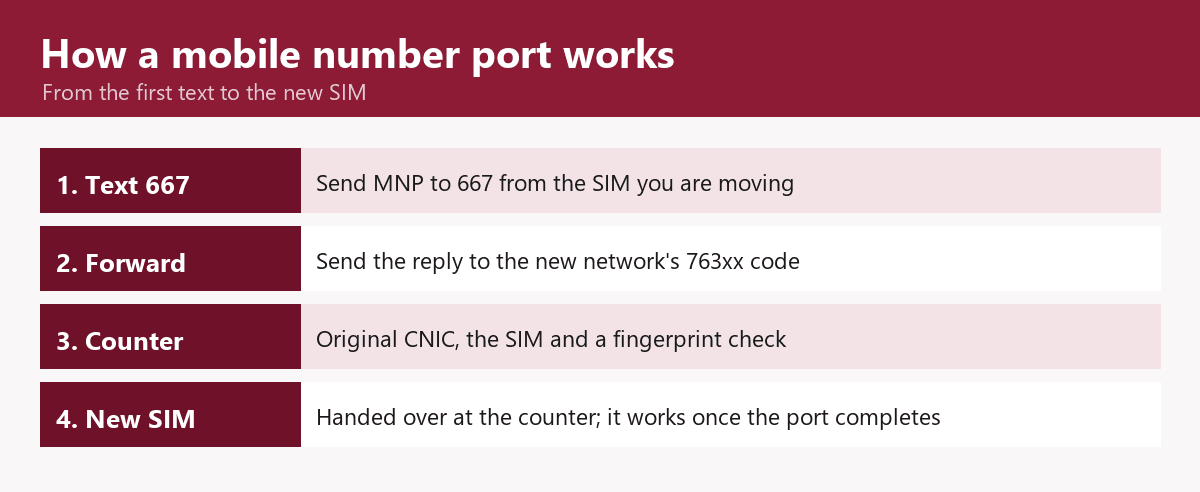
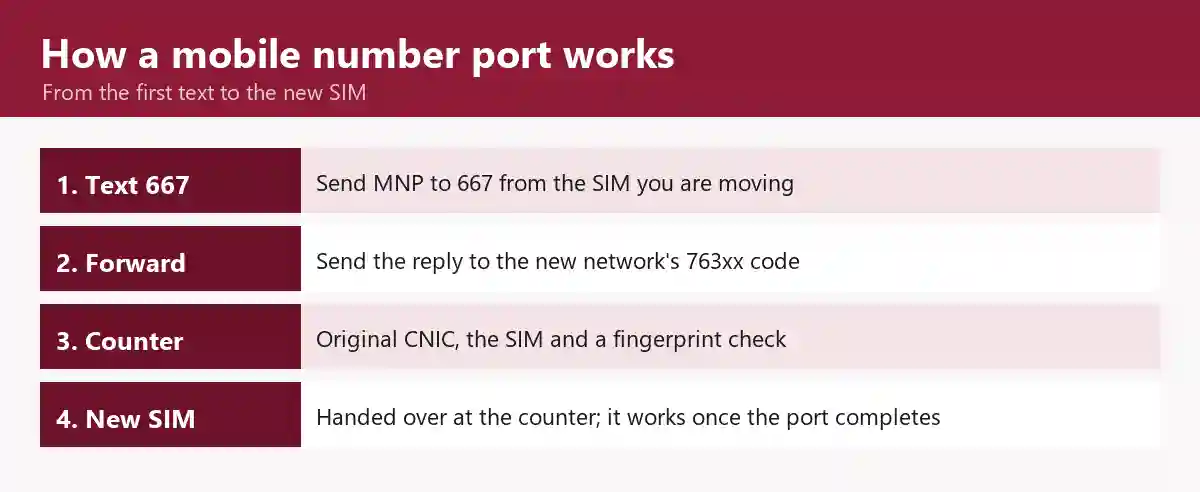
For an individual, the MNP process takes one text, one forward and one counter visit, and the network you are joining does the rest, sending your request to your current network through PMD’s clearing house.
- Check the conditions first: who can port, and when.
- From the SIM you are moving, text MNP to 667 and keep the reply (how to send it and read the reply).
- Forward that reply, unchanged, to the forwarding code of the network you are joining (each network’s forwarding code).
- Go to that network’s service centre, franchise or authorised dealer with the SIM being ported, your original CNIC and a photocopy; a foreign national brings a passport with a valid visa, or a POC. Sign the port-in form as you sign your CNIC. The counter confirms the SIM is with you by having it send and receive the 667 text there, or by calling the number. Before handing anything over, check how to tell a genuine franchise.
- Give your fingerprint. The counter enters the CNIC from the 667 reply, and NADRA matches your fingerprint to it. This is the biometric verification (BVS) step, and MNP is one of the six fingerprint transactions PTA lists.
- Take the new SIM. When it starts working is set out under the switch-over heading below.
The old SIM, the new SIM and the switch-over
Your old SIM keeps working until the port completes; then it stops, the new SIM starts, and PMD puts the gap between the two at no more than an hour. PTA’s regulations cap any no-service period at 24 hours. The date and time of the switch are not yours to choose. Calls reach the new network once every network updates its routing, within five hours of the completion message.
Port number to Jazz: what Jazz adds to the steps
Jazz’s own FAQ follows the same route and adds two details: where to go, and when your dues are cleared. It sends you to a Jazz experience centre, franchise, office or retailer with your CNIC for biometric verification and a new Jazz SIM. Once Jazz hears within four business days that your dues with the other network are clear, the number moves to Jazz.
MNP by network: forwarding codes, fees and porting time
PMD’s consumer FAQ lists four forwarding codes, one for each network in its list, and the table below sets each beside the port-in fee and porting time where the network publishes them, with Onic’s own route and SCO’s absence from PTA’s and PMD’s code lists.
| Network you are joining | Forward the 667 reply to | Port-in fee | Porting time | Also useful |
|---|---|---|---|---|
| Jazz | 76300 (PMD’s FAQ; Jazz’s FAQ) | Rs 300 prepaid; postpaid pays a security deposit only | 4 working days prepaid, 13 working days postpaid | What Jazz adds |
| Zong | 76313 (PMD’s FAQ, which names the company CMPak) | Zong’s price list: “SIM Conversion (MNP)”, free of charge (FOC); ask at the counter about any other charge | Not stated on Zong’s price list or contact page | MNP helpline 0314-3334455, normal package charges |
| Telenor | 76345 (PMD’s FAQ) | Ask at the counter | Ask at the counter | Telenor’s own 667 charge |
| Ufone | 76333 (PMD’s FAQ; Ufone’s port-in page) | Not printed on Ufone’s port-in or MNP page; ask at the counter | Not printed on Ufone’s port-in or MNP page; ask at the counter | A Ufone retailer, or 033 1236 1236 to switch |
| Onic | 76333, from the old SIM, after ordering a “Port In” SIM in the Onic app | Free | Up to 4 business days prepaid, 13-18 business days postpaid | PTA’s order of 11 Sep 2026 stops new Onic connections and subscriptions; ask Onic before starting |
| SCO (SCOM) | No code in PTA’s or PMD’s lists | – | – | The AJK condition |
Warid, listed in PTA’s 2020 guidelines, has no code in PMD’s current list; its numbers are covered under Warid SIMs on the Jazz network. Onic’s status and the SCOM exclusion are covered on the Onic and SCOM guide: Onic after PTA’s order and why SCOM lines sit outside the 667 route.
What a port costs, and what is not refunded
PTA leaves the port-in fee to the network you join, as a matter for market forces in its guidelines, and the table sets out the smaller costs around it and what is not refunded.
| Cost | Amount or rule | Refunded? |
|---|---|---|
| Port-in fee | The amounts networks publish are in the table above | Not if the request is rejected for unpaid dues or a contract (PMD’s FAQ); not if you cancel (PTA’s guidelines and PMD’s FAQ) |
| The 667 text | A paid text on the networks that publish a charge for it; each network’s own guide, linked under the reply table, gives what that network publishes | – |
| The forward to the new network’s code | Jazz’s port-in steps list Rs 2 plus tax for forwarding the reply to its code | – |
| Postpaid security deposit | Your current network may ask for one if it did not take one earlier; for a postpaid port into Jazz, see Jazz’s row in the table above | – |
| Unused prepaid balance | Lost when the number ports; not refunded or carried over | No |
| The fee between networks | At least Rs 250 for each ported number, paid by the new network to the old one | – |
How long a port takes, prepaid and postpaid
PTA’s norm is four days for any port, not counting hold time, and its guidelines let your current network hold a postpaid request up to 9 business days while the bill is settled, or 14 if the line has international roaming. Requests are worked 9 am to 5 pm, Monday to Friday, excluding holidays. PMD’s own guide gives up to four working days for prepaid and 7 to 14 days for postpaid. While the port runs, the old network converts a postpaid line to prepaid free of charge or cuts its credit limit, and it withdraws international roaming the moment the request arrives.
MNP eligibility: who can port a number, and when
PTA’s porting guidelines set what a number must meet before it can be ported; the table lists the conditions, each with its rejection code where it has one, and the fix.
| Condition | What PTA’s rules say | Rejection code if it fails | What to do |
|---|---|---|---|
| Registered to the person porting | The individual asking to port, or a company user holding it by the company’s authority letter (a company starts with a letter to its current network); a spelling mistake alone is not a cause for rejection | R05A name mismatch; R05B ID mismatch | The two routes are under MNP versus change of ownership |
| The SIM handed over is the one in the 667 reply | The SIM number is copied from the 667 reply sent from that line | R05C number and SIM mismatch | Send 667 again from the SIM you will hand over |
| Active | Not disconnected, terminated or blocked | R03A disconnected; R04A blocked | Restore the line with your current network first |
| 60 days since activation, the last port-in or the last change of ownership | No port-out within 60 calendar days | R07A new subscription | Wait until the 60 days have passed (when the clock started) |
| No unpaid dues and no fixed-term contract | Nothing owed on this number or related postpaid numbers; no contract period still running | R06A balance outstanding; R01A contractual obligation | Pay your current network; under PTA’s 2005 regulations an amount you are disputing is not a ground for refusal |
| A recent 667 text (individuals) | A 667 text in the 10 calendar days before the request | R09A 667 not used* | Text MNP to 667 again and forward the new reply |
| A primary number | Not the second number on a double-number SIM | R02A not a primary number | A secondary number cannot be ported |
| Nothing pending | No pending change of number or ownership, and no court case over the number | R08A, R08B | Wait until it is settled |
| A number series outside AJK | Series allocated to AJK are excluded (s.3.4) | Not eligible; no code | The number cannot be ported |
| The network you join has numbers in your district | Allowed only within a district where that network has a number series (s.3.4) | No code | Choose a network with numbers in your district |
| One porting request at a time | Per number | Later requests rejected | Finish or cancel the first (cancelling a port request) |
* Codes and conditions as printed in PTA’s MNP Porting Process Guidelines V7.9.15 (file dated 13 February 2020). The guidelines mark R09A’s “667 not used” meaning as temporary, to move to a new code, R10A.
The clocks on a port, and the waits that belong to other rules
PTA’s guidelines put two clocks on a port, the 60-day wait and the 10-day 667 window in the table, and set out which changes to your record leave the 60 days running. Correcting a name’s spelling, replacing an old NIC with a new CNIC or changing the SIM card does not restart it. The gap between new SIMs on one CNIC does not time a port, and PTA’s 24 May 2026 advisory on the 365-day disowning wait speaks of disowning a newly activated SIM and says nothing about porting.
MNP versus change of ownership
A port moves the number to a new network and keeps it on the same CNIC; a change of ownership keeps the network and moves the number to a new CNIC, so porting cannot put a SIM into your name. For someone else’s number, PMD’s FAQ gives two routes: register it in your name first (moving a SIM into your name), or apply with the name and CNIC it is registered under, which puts the registered holder through the fingerprint step. After a port, the new network accepts a change of ownership only from the 30th day.
When a port goes wrong: counter mismatches, cancellations and unauthorised ports
PTA’s guidelines set out a fix for three ways a port goes wrong: a counter mismatch is corrected and the request raised again, a request you regret can be withdrawn, and a port made without consent can be reversed.
Fingerprint or CNIC mismatch at the counter
If the fingerprint does not match NADRA’s record, or the CNIC typed at the counter differs from the one in the 667 reply, the request is not sent on; the network you are joining tells you the way forward by call or SMS, and you raise the request again. What makes a print fail is under why a fingerprint fails at the counter.
Cancelling a port request
You can withdraw a port request until your number is switched off on the old network, by a signed request with a copy of your CNIC to the network you were joining. What happens to the fee is in the costs table.
A number ported without your consent
Make a written complaint to the network your number was moved away from, in person, by fax or by email, with a copy of your CNIC; if PMD establishes that the port was fraudulent, the number is blocked at once and ported back through a request raised within 10 business days of that finding, and it returns as a ported-in number. Jazz customers also have Jazz’s 30-day dispute window. Using another person’s identity information without authorisation is itself an offence under section 16 of PECA 2016 (the law on other people’s identity information). If the network does not act, the next step to report it is the fraud and harassment reporting route, and swap tricks are covered under SIM swap and other SIM frauds.
MNP kaise karein: number port karne ka tarika
MNP mein number wahi rehta hai, sirf network aur SIM badalti hai: port hone wali SIM se MNP likh kar 667 par bhejein, jawab naye network ke code par forward karein, phir naye network ki franchise par asli CNIC aur wahi SIM ke saath fingerprint verification (BVS) karwayein. Port ke baad bhi SIM usi CNIC par rehti hai. 667 se SIM ka naam check karne ka tarika alag page par hai.
Questions people ask about MNP and 667
Can I check my SIM port status?
PTA’s porting guidelines and PMD’s consumer FAQ describe no port-status tracker. The network you are joining tells you when validation completes and when your new SIM is activated. For a Telenor number, Telenor’s code sheet of November 2020 lists *7637#, a paid code, for porting status. Once the port completes, see checking which network a number is on now.
Can I do the 667 check online or with my CNIC?
No. PTA’s porting guidelines define 667 as a text sent from the SIM itself and describe no web form or CNIC version of it. The official online check works the other way round, from your 13-digit CNIC to a count of SIMs: how many SIMs are on your CNIC, step by step.
Can I port my number back to my old network?
Yes, once the 60-day wait after your last port has passed. Going back is handled as an ordinary port, run through the same steps, even to the network that first issued the number, and moving on to a third network works the same way.
What happens to a ported number I stop using?
After 90 days with no paid use, a ported number is marked inactive and held in quarantine for 180 days, during which any paid use brings it back. After that it is returned, within 30 days, to the network that originally held that number range.
Will my packages and contacts move with my number?
Only the number moves. Call rates and packages are the new network’s and may differ, value-added services have to be subscribed to again, and PTA’s rules bar networks from packages offered only to ported-in customers. Contacts saved on the old SIM stay on it, so copy them to the phone first.
Where the facts on this page come from
| Item | Source | Date on source |
|---|---|---|
| MNP’s definition, the 2005 regulations, the no-service ceiling, one request at a time, the donor’s duty not to block a started port, the lawful refusal grounds, returning and re-porting | PTA, Mobile Number Portability Regulations 2005 | 4 July 2005 |
| MNP’s launch and PMD’s role | PMD, pmdpk.com (About Us) | Undated |
| The start of biometric ports, the 667 format and letter-case rule, the reply fields including Appendix F’s “SIM Number”, the reply window and resend rule, the sender and possession checks, the 10-day 667 rule and the R10A note, the company letter route, the activation date, the connection type, the 60-day rule and its exemptions, eligibility, the AJK and district rules, the porting-time norm and routing, hold periods, service hours, fee rules and the fee between networks, prepaid balance, postpaid settlement, cancellation, rejection codes, the unauthorised-port procedure, change of ownership after a port, quarantine, the packages rule | PTA, MNP Porting Process Guidelines V7.9.15 | File dated 13 February 2020 |
| The current forwarding codes, prerequisites, the not-in-your-name routes, counter documents, the new SIM, the switch-over gap, PMD’s porting times, the porting date and how you are informed, refund rules, packages, contacts, re-porting | PMD, consumer FAQ | Undated |
| MNP among the biometric transactions | PTA, biometric verification page | Undated |
| The disowning advisory’s wording | PTA public advisory, as reported by ProPakistani | Advisory 24 May 2026; report 25 May 2026 |
| Jazz’s porting route, forwarding code, fee, porting times, the charge for the forward, dues confirmation and dispute window | jazz.com.pk FAQs | Undated |
| Ufone’s 667 reply fields, forwarding code and switch line | ufone.com port-in page and MNP page | Undated |
| Zong’s price-list line for MNP | zong.com.pk price list | Undated |
| Zong’s MNP helpline and its charge | zong.com.pk contact page | Undated |
| Telenor’s porting-status code; the 667 text as a paid text | Telenor self-service code sheet | November 2020 |
| Onic’s port-in steps and times | Onic help centre, article “How do I port my number to Onic”, and onic.pk/mnp | Article edited 23 July 2026; onic.pk/mnp undated |
| Onic’s MNP fee and service during a port | Onic help centre, articles on porting fees and on service during a port | 3 February 2025 |
| PTA’s Onic order | Dawn | 15 September 2026 |
| What the IMSI is, and prefixes as first issued | PTA, Consultation Paper on National Numbering Plan | 27 June 2008 (consultation version 6) |
| PECA 2016 section 16 | Pakistan Code | Consolidated text |
Reviewed by Muhammad Zayan on 29 September 2026.
Where to go next
The parent guide to every network’s SIM number check code covers the own-number codes this page leaves out. To see what is registered against you, count the SIMs on your CNIC. For transfers, disowning and blocking, the safety guide sets out each step, and the glossary keeps MNP, IMSI and the other terms, defined.
SIM owner details in Pakistan: the official checks, from the top