
Own-CNIC checks only · Reviewed 28 August 2026 · Sources named in every section
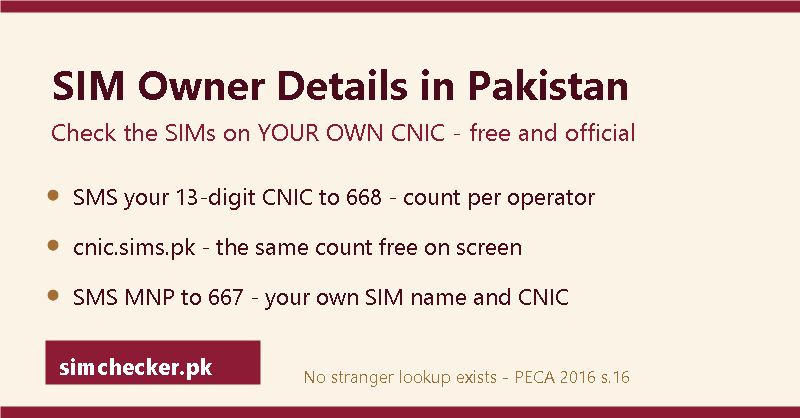
SIM information in Pakistan comes down to one record — the SIMs registered against your own CNIC, checked as a per-operator count via cnic.sims.pk or by sending your CNIC to 668, never a name and never for someone else’s number. This page sets out every field those two checks return, what NADRA does and does not publish, and the same steps in Urdu.
On this page: The fields a check showsWhat NADRA showsID card SIM checkNADRA, BVS and DIRBSEvery spelling, one portalUrdu guide
SIM Details Check: Every Field the Official Portal Shows You
An official SIM details check shows three things: how many SIMs are registered on your own CNIC, which operator issued each one, and whether your total sits inside the 8-SIM legal limit. It shows no names, no addresses and no call records, on any operator in Pakistan.
The fields you actually see
Three fields come back, and that is the entire output. A count, a split by company, and your standing against the legal cap. People expect a fourth field with a name in it, and the count check has no fourth field — the one code that does print a name is covered under the “Owner name” heading below.
The total SIM count on your CNIC
One number: how many connections sit on your card today, across every network. If that single figure is all you came for, the guide to how many SIMs are on my CNIC stays on it from start to finish.
The breakdown by operator
The same total, split into a line for Jazz, Zong, Telenor, Ufone and SCO. Warid sits on the Jazz line and Onic sits on the Ufone line — PTA’s order of 11 September 2026 directed Onic to stop new sales and activations and move its customers to PTML (Ufone) within three months, and Onic’s helpline for that is 051-111-339-111. Telenor merged into PTML, Ufone’s parent, on 1 July 2026, and Telenor SIMs keep working and keep appearing in the count.
Your position against the 8-SIM limit
The cap is eight per CNIC, not six: five for voice, three for data, added together across every operator — the ceiling set out in PTA’s own FAQ, which cites a Supreme Court ruling of November 2015. The 2026 PTA SIM rules page tracks any change to that ceiling.
The fields no official check ever shows
No official check ever shows an owner name, a home address, a call history, a live location or a CNIC photo for another person’s CNIC or number. No portal, app, franchise counter or SMS reply in Pakistan prints any of the five, and the list is fixed by law rather than by a missing feature. On your own side there is one narrow exception, covered under the owner-name heading.
The table sets each field against the reason it is absent.
| Field | Shown? | Why |
|---|---|---|
| SIM count on your CNIC | Shown | PTA holds the count and releases it to the CNIC holder |
| Operator breakdown | Shown | Part of the same count |
| Owner name | Not shown | Not public; only MNP to 667 shows the sending SIM’s own registered name |
| Home address | Not shown | Held by the operator, released only on a legal request |
| Call history | Not shown | Moves to police or a court, never to a website |
| Live location | Not shown | No public service holds it in any form |
| CNIC photo or family record | Not shown | NADRA publishes nothing after issuance |
Owner name
The count screen prints no name, not even your own — it is a counter, not a directory of people. To see the name a SIM in your own pocket is registered under, text the word MNP to 667 from that SIM. The reply shows the registered name and CNIC (part-masked) for that one SIM; some replies also carry the activation date — nothing about any other line. What a phone number on its own can and cannot tell you is set out in the number details guide.
Home address
Your operator holds it in your file. It leaves that file only on a written legal request.
Call history
Released to an investigating officer under a case number, and to nobody else.
Live location
No lawful public route exists. Any page offering it is selling a story.
Any CNIC photo or family record
NADRA verifies identity when the SIM is issued and publishes nothing afterwards. DIRBS, by contrast, checks handsets by IMEI — a different system entirely, often confused with a SIM-owner record.
Reading your result correctly, step by step
A count on its own means little until you match it against the SIMs you can physically find. Most unpleasant surprises are old connections you forgot, but some are lines opened on your CNIC without you. Five steps separate the two.
Step 1 — Add the operator lines together
The lines should equal the total. If they do not, run the check again.
Step 2 — Match each line to a SIM you actually hold
Include the spare in the drawer and the one in an old handset.
Step 3 — Circle anything you do not recognise
Write the operator down. That is the only detail you need to carry.
Step 4 — Bring the unrecognised item and your original CNIC to your operator’s counter
Your thumb on the scanner proves the record is yours to question. The nearest sim franchise for each operator is listed by city on its own page.
Step 5 — Ask for it to be blocked and keep the complaint number
The complaint number is your proof if the line reappears.
Different words, same check
Four search phrases lead to one screen. People type them differently because they learned the words in different places, not because four separate services exist. Every phrase below ends at the same portal: enter your CNIC at cnic.sims.pk, or send it by SMS to 668, and sim owner details in Pakistan: the official checks sets out both replies line by line.
“sim details check”
The most common wording. Same portal, same three fields.
“sim detail”
Singular, usually typed by someone checking one SIM. Same answer.
“sim card details”
Adds “card” and changes nothing. There is no separate card-level record to read.
“pakistani sim details”
Adds the country. The rules described here are Pakistani rules already.
One check, three fields, and not one of them is a name.
CNIC Information Check: What NADRA Does and Does Not Show
NADRA issues your CNIC and verifies your identity, but it runs no public page turning a CNIC or a phone number into anyone’s name. CNIC information checks that actually work are limited to your own record, and you prove the record is yours with your own CNIC number and your own handset.
People also search for “check cnic details”, “cnic info.pk” and “cin number check” — each one lands on the same CNIC-bound record covered here.
What a CNIC actually is
It is a 13-digit number that NADRA prints on a card carrying your name and photo. Those digits are the key every SIM in the country hangs off. The number tells a system where the card was issued and whose gender is recorded, and nothing more than that.
It is 13 digits, and most official forms want those digits with no dashes
The printed card shows dashes. The 668 SMS and cnic.sims.pk want them stripped out.
The first five digits point to the area where it was issued
They record the issuing district, not where you live today.
The last digit shows gender
One digit, and that is the extent of what it says about you.
NADRA issues it; PTA and the operators only use it for SIM registration
Three separate bodies, three separate jobs. None of them publishes your sim owner details to a website.
Checks you can run on your own CNIC today
Four routes are open: cnic.sims.pk in a browser, an SMS to 668, a NADRA centre in person, and your operator’s franchise — all four start from the card in your hand. Each returns the sim owner details tied to that one card. Two are remote — the website costs nothing and the SMS may carry a charge (historically Rs 2) — and two need you in person. None of them will run against a CNIC belonging to somebody else, which is the point of the design.
Route 1 — Open cnic.sims.pk, enter your 13 digits, solve the reCAPTCHA next to “Verify:”, click Submit, read the SIM count
PTA’s SIM Information System. Free, and it takes about a minute.
Route 2 — Open Messages and send your 13 digits, no dashes, to 668 for the same count
The same count, delivered by SMS to the handset you sent from.
Route 3 — Visit a NADRA centre in person with your original CNIC for your own identity record
This is the only place your identity record is discussed at all, and only with you.
Route 4 — Visit your operator’s own franchise with your CNIC and your thumb for biometric confirmation
The Biometric Verification System reads your thumb first — the steps that tie a SIM to your CNIC cover that part in full — then staff read out your full list with that operator.
What NADRA never publishes to a website
NADRA never publishes a number-to-name page, an address lookup, a family-record lookup, a photo lookup or third-party access for public lookup websites and apps. Five things people search for every day are absent from every public page it runs, and that absence is deliberate policy rather than a gap waiting to be filled. NADRA holds a great deal and releases almost none of it.
The table names each thing people expect from NADRA and what NADRA actually offers.
| What people search for | Does NADRA publish it? |
|---|---|
| A number-to-name page | No such page exists |
| An address lookup | Never published |
| A family-record lookup | Never published |
| A photo lookup | Never published |
| Third-party access for a website or app | Granted to nobody |
No number-to-name page
A phone number goes in and nothing comes out, because the service was never built.
No address lookup
Your address sits in your NADRA file and in your operator’s file. Neither one is a public page.
No family-record lookup
Family records are discussed at a NADRA counter with the person they belong to.
No photo lookup
The photo on your card is not searchable by anyone outside NADRA.
No third-party access of any kind
A site putting the NADRA name beside a search box is borrowing a name it has no right to use. No sim owner details reach it from NADRA.
NADRA verifies identity at issuance and never publishes it afterwards.
ID Card SIM Number Check Online: Same Rule, Different Words
“ID card” and “CNIC” name the same document, so an ID card SIM number check is the CNIC check under a different word. It returns how many SIMs sit against your own ID card, split by operator. It returns nothing about anybody else, whichever of the two words you search.
ID card, CNIC, shanakhti card: one document, three names
Three words, one green card, one set of thirteen digits.
“ID card” is the everyday English word
What most people say out loud, and what most people type when they go looking.
“CNIC” is the official abbreviation, Computerised National Identity Card
The word NADRA prints on the card and the word every government form uses.
“Shanakhti card” is the everyday Urdu word
What the man at the franchise counter will ask you for.
All three carry the same 13 digits, and every official form wants those digits without dashes
Your card shows them with two dashes. The portal wants your 13-digit CNIC as digits only, no dashes.
People also type the portal’s address loosely — “cnic.sim.pak”, “cnic. sims. pk”, even “cnic.sims.apk” — every version means the same website, cnic.sims.pk, and there is no app to download.
Run the ID card SIM check in six steps
PTA’s SIM Information System does this in under a minute, free, with no account — the step-by-step portal walkthrough shows the real form with screenshots; the six taps below are that same process under the ID-card name.
Step 1 — Open cnic.sims.pk
The page is titled “SIM Information System” and shows two tabs.
Step 2 — Keep the CNIC tab selected
The second tab, Foreign ID, is only for foreign nationals living here.
Step 3 — Type the 13 digits from your ID card, with no dashes
PTA’s own placeholder on the page shows the shape it wants — thirteen digits run together — so match it with your 13-digit CNIC and nothing else.
Step 4 — Solve the reCAPTCHA beside the word “Verify:”
A Google reCAPTCHA sits on the form — tick the box and watch for it to turn green.
Step 5 — Press Submit
One press. There is no login and no payment screen.
Step 6 — Read the SIM count and the operator-by-operator split
You get a total, then a line for each network. That is the whole result, and the sim owner details it covers are only ever your own.
The SMS version when you have no internet
Text your 13-digit CNIC to 668 and the same answer arrives by text message on any handset, smart or not; PTA says charges may apply (historically Rs 2). The reply is sender-bound: it goes to the SIM that sent the message and to no other handset.
Step 1 — Open the Messages app
Start a new message on the SIM you are holding.
Step 2 — Type the 13 digits of your ID card, no dashes, nothing else
No name, no word, no extra number. Digits only.
Step 3 — Send the message to 668
668 answers only the line it heard from: it reads the digits you typed and replies to that same SIM.
Step 4 — Read the reply, which lists your total and your per-operator count
If a network shows a SIM you never bought, take your original ID card to that operator’s own franchise and ask for it to be blocked.
Your ID card number and your CNIC number are the same thirteen digits.
NADRA and SIM Data: What NADRA Actually Does
NADRA issues CNICs and confirms identity through biometrics; PTA and the operators handle SIM registration and the public SIM count. NADRA runs no SIM ownership page for the public, and it returns no photo, no family record and no address to any website. Pages using NADRA’s name for a number lookup are borrowing authority they do not hold.
Who does what: NADRA, PTA, the operators and the NCCIA
NADRA issues the CNIC, PTA runs cnic.sims.pk and the 668 service, the operators hold the subscriber file, and the NCCIA investigates cybercrime, with its helpline on 1799. Four bodies touch your SIM, and each one stops at a different line. The table below shows where each line falls.
| Body | What it does | What it will not do |
|---|---|---|
| NADRA | Issues the CNIC, verifies identity at issuance | Run any public number-to-name lookup |
| PTA | Runs cnic.sims.pk and the 668 SMS service | Return a name, an address or a call record |
| Operators | Register SIMs against a CNIC, hold the subscriber file | Show your file to anyone but you or a lawful authority |
| NCCIA | Investigates cybercrime on a filed complaint | Hand you the raw record of the person you reported |
NADRA — issues the CNIC and verifies identity at issuance
Its job ends when your identity is confirmed. It never becomes a phone directory.
PTA — runs the SIM Information System at cnic.sims.pk and the 668 SMS service
Both return one thing: a count of SIMs on the thirteen digits you supplied.
Operators — register SIMs against a CNIC and hold the subscriber record
Each operator — Jazz, Zong, Telenor, Ufone, Onic, SCO — keeps its own subscriber file, released only after a thumb scan at that operator’s counter.
NCCIA — investigates cybercrime and misuse, on a filed complaint
The cybercrime helpline is 1799. It can lawfully do what no citizen may do alone.
How the Biometric Verification System (BVS) works
BVS is the thumb scanner on the franchise counter, and it is what ties a SIM to a person in Pakistan. Staff enter your 13-digit CNIC, you place your thumb on the scanner, the print is checked against NADRA’s record for that card, and a match registers the SIM against your CNIC.
Step 1 — Walk into your operator’s outlet holding your original CNIC card
An original card, not a photocopy and not a picture on your phone.
Step 2 — The staff member enters your 13-digit CNIC
The same thirteen digits the PTA portal asks for, typed without dashes.
Step 3 — You place your thumb on the BVS scanner
The scan is matched against the fingerprint NADRA already holds for that card.
Step 4 — The scan is matched, and the SIM is registered to you and counted against your CNIC
From that moment the connection appears in your count, and the sim owner details for it name the card that was scanned. Proving a SIM is yours from start to finish is covered in the SIM ownership check guide.
DIRBS is a device system, not a SIM owner system
DIRBS answers one question about the handset — whether it is legally usable on Pakistani networks — and says nothing about the person holding it. It is PTA’s device system: dial *#06# for the IMEI, SMS it to 8484 or use dirbs.pta.gov.pk, and no result names a SIM’s owner.
What DIRBS checks: whether a handset is legally usable on Pakistani networks
Compliant or non-compliant. That is the entire verdict it gives.
What an IMEI is: the handset’s own serial number, not the SIM’s
Swap the SIM and the IMEI does not change. They are two separate things.
Why a device status tells you nothing about who owns a SIM
A phone can carry any SIM. The two records are not joined for public reading.
Why “IMEI to owner” searches fail for the same reason number-to-name searches fail
There is no public input anywhere that takes a device or a number and returns a person.
Three things NADRA will never hand to a website
Your CNIC photo, your family details and any other person’s name or address — NADRA hands none of the three to any website. People search for these three every day, and the answer is the same for all three: never published.
Your CNIC photo
The picture on your card stays inside NADRA’s own systems.
Your family details
Family registration data is not released to any commercial page.
Any other person’s name or address
Not for a fee, not for a free trial, not for any reason a page can invent.
NADRA verifies people, PTA counts SIMs, and neither one runs a number-to-name lookup.
SIM Information and Sim Info: The Words People Search
“SIM information” and “sim info” point at one lawful answer: the SIM record attached to your own CNIC. The official source is the PTA SIM Information System at cnic.sims.pk. Every variation people type — sim info pk, pak sim information, sim card information — lands on that same single answer.
The one source behind every spelling
The one source is the PTA SIM Information System at cnic.sims.pk, which takes your own 13-digit CNIC and returns your SIM count. Five different phrases, one destination, and none of them opens a different door. The same count also arrives by SMS from 668.
“sim information” — the full phrase
The words printed at the top of PTA’s own page, “SIM Information System”.
“sim info” — the short form
Typed by people in a hurry. It reaches the same portal.
“pak sim information” and “pak sim info” — the same phrase with a country prefix
Adding “pak” narrows the phrase to Pakistan. It does not add any new service.
“sim card information” — the same phrase with the word card added
The card in your phone and the record on your CNIC are the same connection.
“sims information system” and “sim information systems” — the plurals
Both land on the same page. So do “sin information system” and “sin info”, where the m slips into an n.
“pmd sim information” — letters people bolt on
“pmd sim information system” adds nothing either. Behind both sits the one count at cnic.sims.pk.
“simdata info”, “simdata information” and “sim info 2024” — squashed spellings and year tags
The year changes, the answer does not. “www.sim info.com” is the same search typed as a web address; the real address is cnic.sims.pk.
“same information” and “sin number details pakistan” — autocorrect at work
Phones turn sim into same or sin. The question underneath is unchanged.
All of them resolve to the PTA SIM Information System at cnic.sims.pk
One portal, one input of thirteen digits, one count of your own sim owner details.
Fields the SIM Information System actually returns
Whichever spelling brought you here, the result is the same three lines the fields section above already sets out: your total count, the operator breakdown, and nothing more — no name, no address, no call record. The portal was built to count, not to describe; anything more would need a court or the NCCIA.
Reading your result without panic
A number higher than you expected usually has a dull explanation — an old data SIM in a drawer still holds a place against the eight-SIM limit. Work through it in order, and only an operator line you cannot account for needs a franchise visit.
Step 1 — Read the total number at the top of the result
Remember the ceiling: eight SIMs per CNIC, five voice plus three data.
Step 2 — Match each operator line against a SIM you actually use
Count the old ones too. A data SIM in a drawer still holds its place.
Step 3 — Write down any operator line you cannot account for
Write the network name and the number of SIMs it shows. That note is what the counter staff need.
Step 4 — Hand your note and original CNIC to the counter staff and ask for the unknown SIM to be blocked
Their own franchise, not a roadside stall. Your thumb goes on the scanner and the sim owner details on your card are checked in front of you.
Step 5 — If the counter staff take no action, raise the matter at complaint.pta.gov.pk
Keep the reference number the complaint desk gives you. It is what moves the case forward.
Every spelling of “sim information” resolves to the same CNIC-bound record.
Urdu Mein: Sim Kis Ke Naam Hai Aur Kaise Check Karein
Only your own CNIC opens your own SIM record. Apne CNIC par kitni SIM registered hain, yeh aap khud check kar sakte hain; kisi doosre ka naam kisi bhi tareeqe se nahin milta. The two official routes are the cnic.sims.pk website and an SMS to 668, and neither accepts a stranger’s number.
Apne CNIC pe kitni SIM hain — website ka tarika
cnic.sims.pk kholein, apna 13 hindse ka CNIC likhein — chhe qadam, do minute, aur ginti screen par aa jati hai. Na account chahiye, na koi app, sirf browser. Yeh aap ke apne sim owner details hain, kisi aur ke nahin.
Step 1 — cnic.sims.pk kholein (open cnic.sims.pk in any browser)
Page ka naam “SIM Information System” hai aur ise PTA chalata hai. Na account, na app.
Step 2 — CNIC tab par hi rahein (stay on the CNIC tab)
Doosra tab Foreign ID ka hai, ghair-mulkiyon ke liye. Pakistani card wale wahin rahein.
Step 3 — Apna 13 hindse ka CNIC likhein, dash na lagayein, sirf hindse (type your 13-digit CNIC, no dashes)
Poore terah hindse. Dash lagaya to form qubool nahin karega.
Step 4 — “Verify:” ke saath wala reCAPTCHA solve karein (solve the reCAPTCHA)
Google ka reCAPTCHA usi label ke saath hai. Tick karein aur hara nishan aane dein.
Step 5 — Submit ka button dabayein (click Submit)
Ek hi button hai. Jawab usi page par khul jata hai.
Step 6 — Total aur har company ki alag ginti parhein (read the total and the per-operator split)
Pehle ghar ke handset gin lein, phir list parhein. Jo line samajh na aaye, wahi asal masla hai.
SMS ka tarika — 668
Apna 13 hindse ka CNIC, bina dash, 668 par SMS karein — jawab mein SIM ki ginti aati hai; PTA ke mutabiq is par charges lag sakte hain (pehle yeh Rs 2 tha). Jis ke paas net nahin, us ke liye yehi tarika hai, aur jawab usi SIM par aata hai jis se message bheja gaya.
Step 1 — Messages app kholein (open Messages)
Aam SMS wali app, WhatsApp nahin.
Step 2 — Sirf apna 13 hindse ka CNIC type karein, aur kuch nahin (type only your 13-digit CNIC)
Na naam likhein, na koi lafz. Sirf hindse.
Step 3 — 668 par bhej dein (send to 668)
Teen hindse recipient ke khane mein, aur kuch nahin.
Step 4 — Jawab mein SIM ki ginti parhein (read the SIM count in the reply)
Total aata hai aur har company ki alag line. Had aath SIM hai: paanch voice aur teen data — yeh had PTA ke apne FAQ mein likhi hai, jo November 2015 ke Supreme Court ke faisle ka hawala deta hai. Jo log “chhe SIM” kehte hain, woh ghalat hai.
Number kis network ka hai — 76367
N likhein, space dein, phir 11 hindse ka number, aur 76367 par bhej dein — jawab mein sirf network ka naam aata hai, qeemat Rs 2 jama tax. Yeh alag sawal hai, aur kisi ke sim owner details is se nahin milte.
Step 1 — Messages app kholein (open Messages)
Wahi aam SMS wali app.
Step 2 — N likhein, space dein, phir 11 hindse ka number, jaise N 03XXXXXXXXX
Bara N, ek space, phir number. Na dash, na country code.
Step 3 — 76367 par bhejein (send to 76367)
Paanch hindse recipient ke khane mein.
Step 4 — Rs. 2 jama tax kat-ta hai, balance rakhein (Rs. 2 plus tax is charged)
Yeh qeemat PTA ne khud apne portal par likhi hai.
Step 5 — Jawab mein sirf network ka naam aata hai, kisi shakhs ka naam nahin (the reply names the network only, never a person)
Jazz, Zong, Telenor, Ufone, Onic ya SCO. Bas itna hi. Yeh service is liye bani ke portability ke baad prefix se network ka pata nahin chalta.
Sim kiske naam hai — asal jawab
Asal jawab: kisi doosre ki SIM ka naam kisi website, app ya code se nahin milta. Apni SIM ka registered naam usi SIM se MNP likh kar 667 par bhejne se milta hai, sirf bhejne wali SIM ke liye. Zyada tar log kisi doosre ke sim owner details dhoondte hue yahan pahunchte hain, aur seedhi baat yehi hai.
Kisi bhi website par doosre ka naam nahin milta (no website returns another person’s name)
Jo page naam dikhane ka dawa kare, us ke paas ya purani leaked list hai ya kuch bhi nahin. Operator ka record us tak nahin jata. Apni SIM ka record dekhne ka tareeqa yeh hai: usi SIM se lafz MNP type karke 667 par bhej dein, jawab mein sirf usi SIM ka number, registered naam aur (kuch hindse chhupe) CNIC milta hai — kisi doosri SIM ka nahin.
NADRA koi public number-to-name lookup nahin chalata (NADRA runs no such lookup)
NADRA CNIC jari karta hai aur shanakht ki tasdeeq karta hai. Number daal kar naam nikalne wali koi awami service us ke paas hai hi nahin.
PECA 2016 ki dafa 16 mein 3 saal tak qaid ya 50 lakh rupay tak jurmana, ya dono (PECA 2016, section 16)
Kisi doosre ki shanakhti maloomat uski marzi ke baghair haasil karna, apne paas mehfooz rakhna, becha jana, kisi ko bhejna ya kisi bhi soorat istemal karna — sab jurm ke daire mein aata hai.
Shikayat NCCIA helpline 1799 par ya complaint.pta.gov.pk par darj karayein (report on 1799 or the PTA complaint desk)
Agar koi number tang kar raha hai ya fraud kar raha hai, yehi do darwaze hain. Screenshot aur tareekh sambhal kar rakhein.
Yaad rakhein: apni SIM ki ginti cnic.sims.pk aur 668 se milti hai, network ka naam 76367 se. Kisi doosre ka naam, CNIC ya address kahin se nahin milta — na website se, na app se, na kisi paise wale “report” se.
Apne CNIC ka record aap khud dekh sakte hain, kisi doosre ka nahin.
Where to go next
For the “sim database” and “pak sim data” claims — neither is a real public record — see the guide to those two search terms. Unfamiliar terms — BVS, DIRBS, MNP and the rest — are explained in the glossary.